
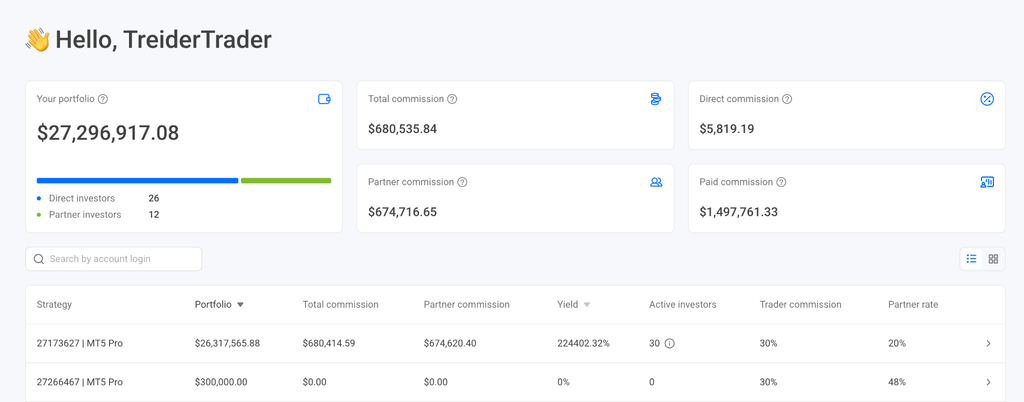
The Copy Partner Dashboard provides Traders with a clear overview of their partnership performance, investor base, and earnings. Below are the key details you can monitor on your dashboard:
- Your portfolio: the total balance of all subscribed investors and your trading accounts
- Partner investors: the number of investors who subscribed to you through a Copy Partner link
- Direct investors: the number of investors who subscribed to you without a Copy Partner link
- Total commission: the total commission earned from Direct and Partner Investors
- Direct commission and Partner commission: the commission earned from Direct and Partner Investors
- Paid commission: the total amount paid by the Trader to Copy Partners
Copy Partner rewards are paid out of your commission, not on top of it. Investors pay the same commission whether they subscribe directly or through a Copy Partner link.
Each of your strategies is shown as a card. You can search by account login, sort the cards (by default, by Highest Portfolio), and switch between card and list views. Each card shows:
- Portfolio and Total commission
- Active investors and Trader commission
- Partner commission and Partner rate
The list view also shows each strategy’s Yield.
If the program is already activated, click View Trader Offer on an account to see and manage your detailed partnership settings, tier structure, and Partner Groups.
If the program is not activated, click Activate next to the desired account to set up and configure the Copy Partner Program for it.