
Partner Groups let Traders give a higher commission rate to hand-picked Copy Partners. Unlike tiers, a Partner Group has no earnings requirement: the Copy Partners you add get the group’s rate straight away.
Use Partner Groups to reward the Copy Partners who matter most to your strategy, such as your most active promoters, regardless of how much commission they have earned so far.
How Partner Groups work
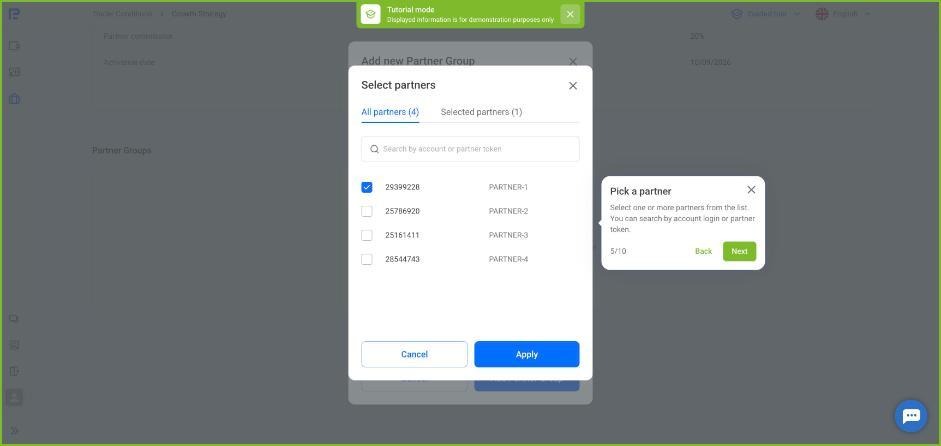
- You choose which Copy Partners to add to a group from your list of partners. You can find a partner by account number or by their token: the characters after “=” in their Copy Partner link
- The group’s commission rate must be higher than your standard rate
- You can create as many Partner Groups as you need
- Changes to Partner Groups apply immediately, without waiting for Monday
- You can create a Partner Group once you have at least one Copy Partner
Example:
- Your standard Copy Partner commission rate is 50%
- You create a group with a 70% rate and add two Copy Partners to it
- These two Copy Partners now receive a 70% commission rate for the investors they refer, while all other Copy Partners receive 50% or their tier rate
Partner Groups and tiers
You can use Partner Groups and tiers at the same time. If a Copy Partner qualifies for both, the higher commission rate applies.
How to set up a Partner Group
- In the Copy Partner Dashboard, go to Trader Conditions and click View Trader Offer on the strategy card.
- On the strategy page, scroll down to Partner Groups and click Add new Partner Group.
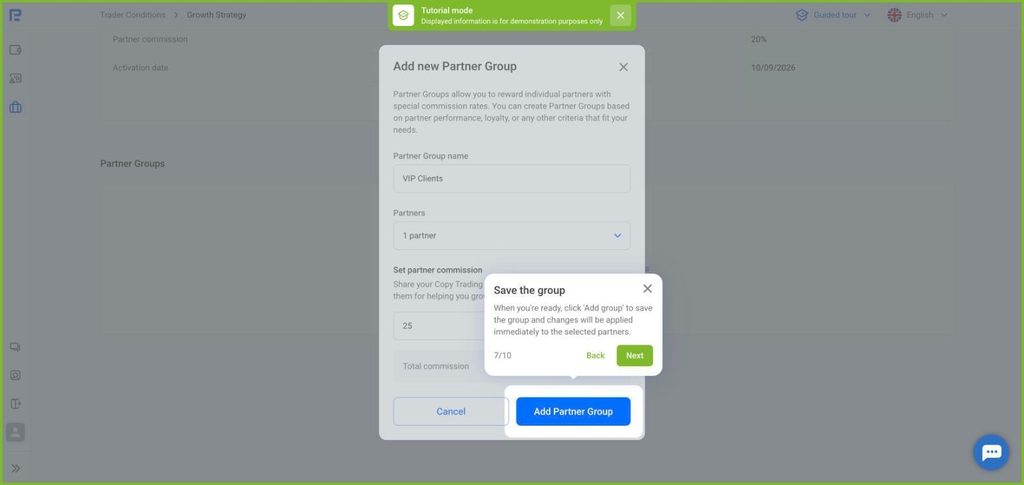
- Enter the Partner Group name.
- In Partners, open the list, select the Copy Partners you want to add and click Apply.
- In Set partner commission, enter the group’s commission rate.
- Click Add Partner Group. The group appears in the Partner Groups table, where you can edit or delete it.
If you remove a Copy Partner from a group or delete the group, the investors they have already referred keep their current rate. New investors they refer get the rate under your current conditions (see article).