
Tiers are progression levels that allow Copy Partners to earn higher commission rates based on their performance. As a Copy Partner earns more commission from investors they have referred, they can advance to higher tiers with higher commission rates.
How tier progression works
Copy Partners can move to a higher tier to increase their commission rate. To do so, they need to earn a certain amount in commission from all the investors they have referred to the Trader’s strategy through their unique Copy Partner link. The amount is determined by the Trader.
Once the total Copy Partner commission earned through their unique link reaches the specified amount, they will automatically advance to the next tier. Each higher tier offers an increased commission rate, meaning Copy Partners earn more from the same investors going forward.
Commission earned by a Copy Partner before the tiers were set up also counts towards the tier amount.
Example:
- The standard Copy Partner commission rate is 50%
- Tier 1 requirement: 100 USD in partner commission earned from investors
- Tier 1 commission rate: 60%
When a Copy Partner earns 100 USD in commission from investor subscriptions, their partner commission rate rises from 50% to 60%.
How Traders can set up or edit tiers
- In the Copy Partner Dashboard, go to the left-hand menu and select Trader Conditions.
- Click View Trader Offer on the strategy card.
- On the strategy page, go to Partnership Settings and click Edit settings. In the Standard section, you’ll see your current commission rate in the Active column (marked in green).
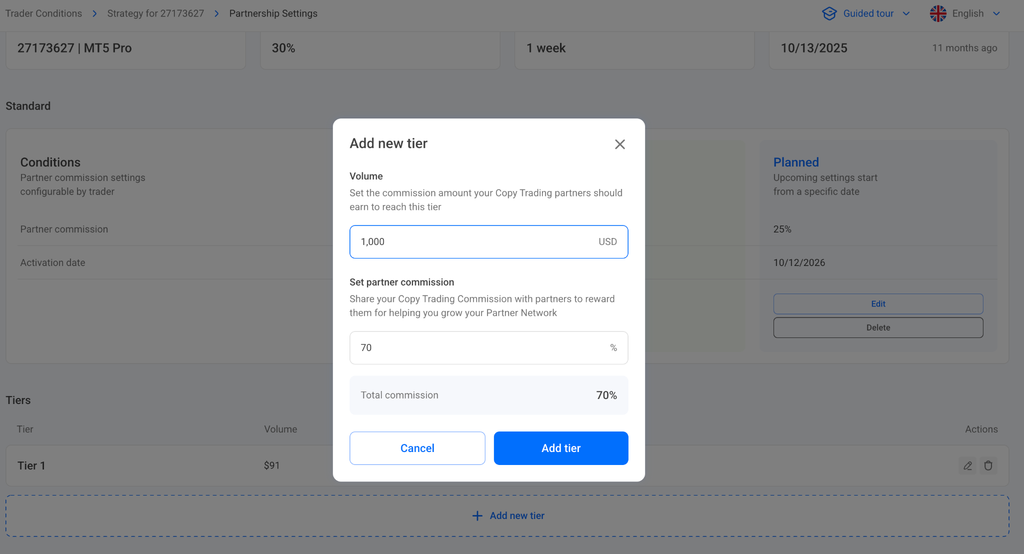
- Scroll down to Tiers and click Add New Tier.
- In the Add New Tier window, set the following:
- Volume (USD): the total commission amount a Copy Partner must earn from investors to reach this tier (it must be higher than the amount for the previous tier)
- Set partner commission (%): the new commission rate for this tier (it must be higher than your standard rate and the rate for the previous tier)
- Click Add tier to save, then click Confirm at the bottom of the page to apply the changes. A banner on the strategy page shows the date when the new tiers take effect. The date is set automatically and can’t be changed. Until then, you can only cancel the planned changes by clicking Cancel changes in this banner.
Important notes
- Copy Partners will be automatically notified when the Trader changes the tiers
- You can add, edit, or delete tiers on the same Partnership Settings page. New and changed tiers take effect on the following Monday if you confirm them on a weekday (Monday to Friday), or on the Monday after next if you confirm them on a Saturday or Sunday. The effective date is set automatically and can’t be changed. If you need to undo planned changes, cancel them
- If you delete or change a tier, investors already referred by a Copy Partner keep the highest commission rate that has applied to them (see article)
- You can use tiers together with Partner Groups. If a Copy Partner qualifies for both, the higher commission rate applies (see article)