Pending Orders: Learning Buy Limit and Sell Limit, Buy Stop and Sell Stop

Pending orders are instructions to open a trade later, when the price reaches a level you set in advance. There are four of them. A Buy Limit buys below the current price and a Sell Limit sells above it, for a bounce off a level. A Buy Stop buys above the current price and a Sell Stop sells below it, for a breakout. Until the price gets there, nothing opens and no money is at risk.
TL;DR
- Expect a bounce off a level: use a Buy Limit below the price or a Sell Limit above it.
- Expect a breakout: use a Buy Stop above the price or a Sell Stop below it.
- Add a Stop Loss and a Take Profit to the order, so the trade opens and closes without you.
This article is devoted to trading with pending orders: Buy Limit, Sell Limit, Buy Stop, Sell Stop. Pending orders are great helpers in various trading strategies.
What Pending Orders Are For
A pending order is an order to open/close a buying/selling position as soon as the price reaches a certain level. Unlike market orders that are executed immediately by the current price, pending orders are only triggered when the quotations reach a specified value. If they do not reach it at all, the order will simply not be executed.
A trader is not always glued to the trading terminal and cannot always grasp the right moment for opening a position. To close or open one at a certain price while busy doing other things, they use pending orders.
This is most useful for those who trade by tech analysis. They can place pending orders near strong support/resistance level counting on a bounce off it or a breakaway.
Apart from orders to open positions, traders actively use pending closing orders: Stop Loss and Take Profit.
- Stop Loss is a protective order meant to close a losing position. It is placed to limit risks if the trading situation goes wrong.
- Take Profit is an order that automatically closes a profitable position as soon as the quotations reach the level specified by the trader.
Learn more about SL and TP in the article How to Use Stop Loss and Take Profit: Placing Orders on the Chart.
The table sums up the four pending orders to open positions, with the examples used below.
| Order | Where it goes | When to use it | Example |
|---|---|---|---|
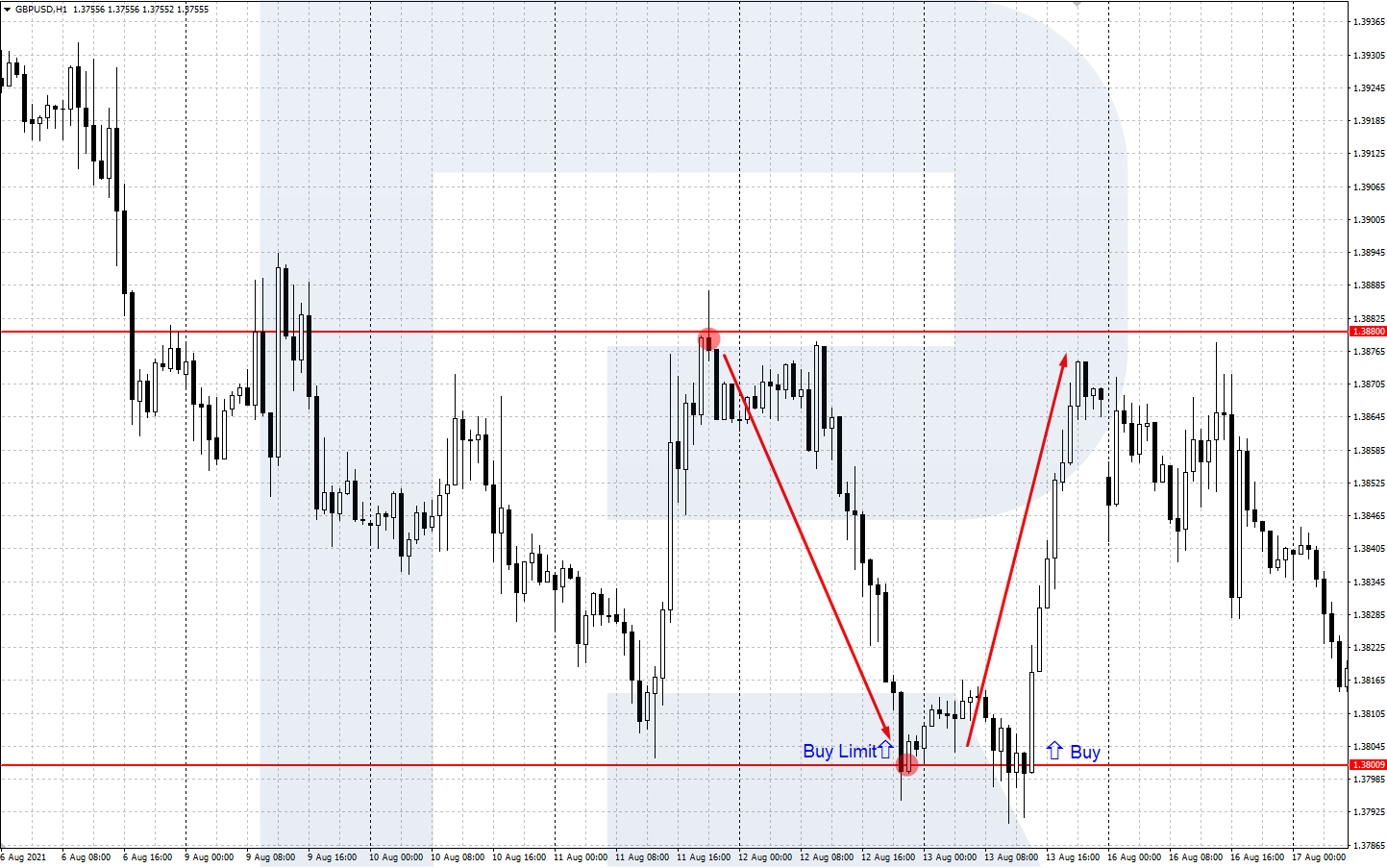
| Buy Limit | Below the current price | You expect a fall to support and a bounce up | GBP/USD at 1.3880, Buy Limit at 1.3800 |
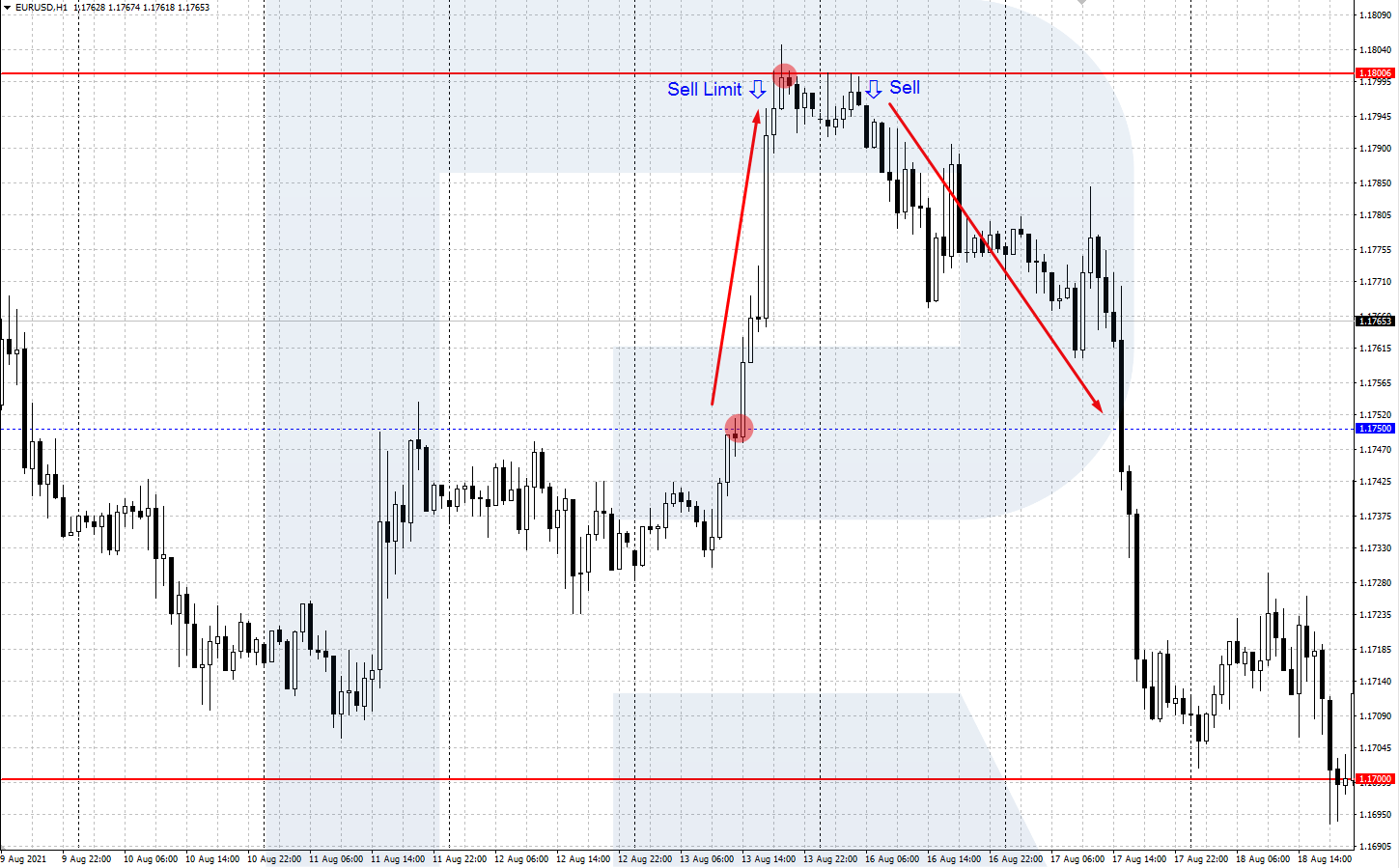
| Sell Limit | Above the current price | You expect a rise to resistance and a turn down | EUR/USD near 1.1750, Sell Limit at 1.1800 |
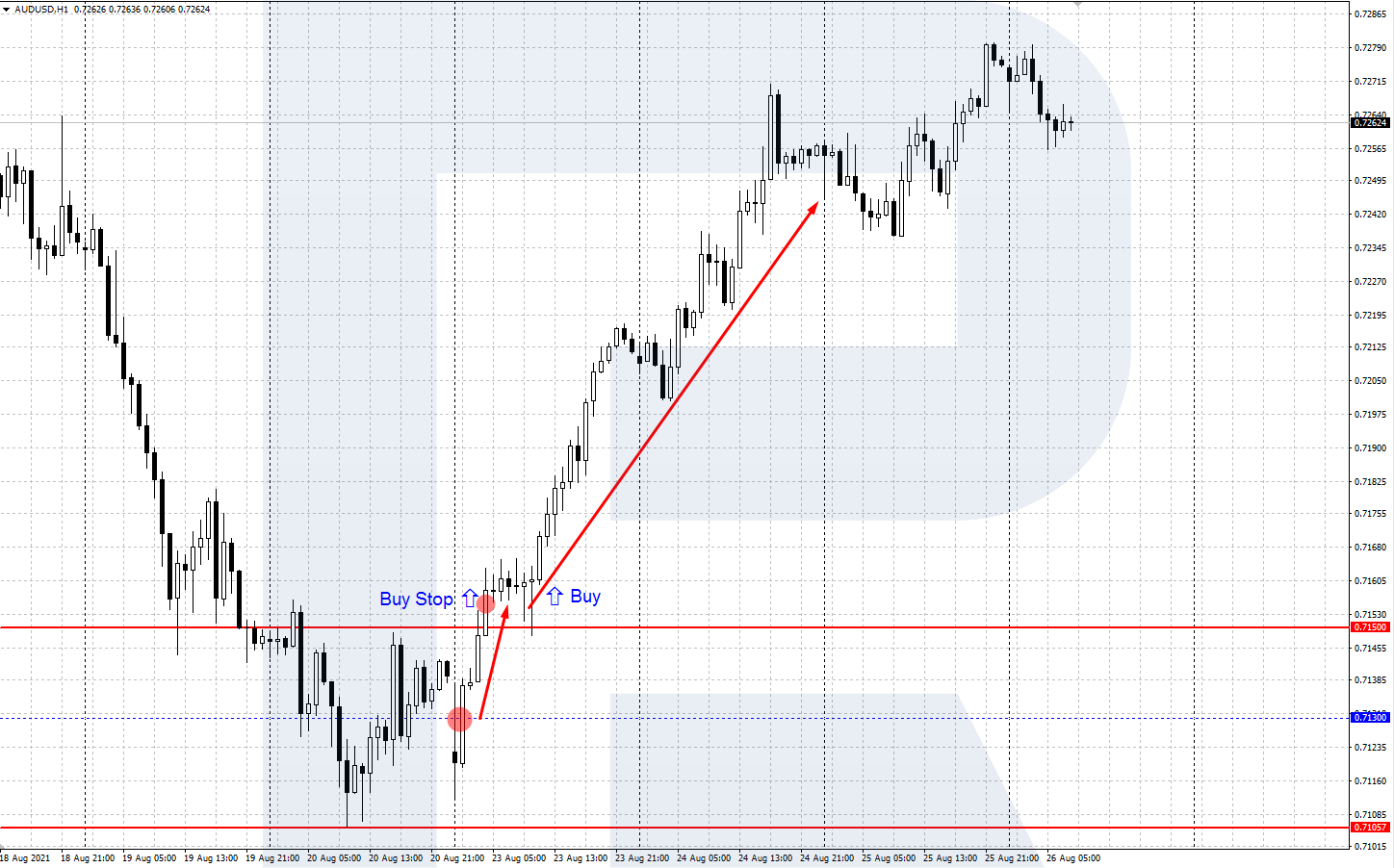
| Buy Stop | Above the current price | You expect a breakout of resistance and further growth | AUD/USD at 0.7130, resistance 0.7150, Buy Stop at 0.7160 |
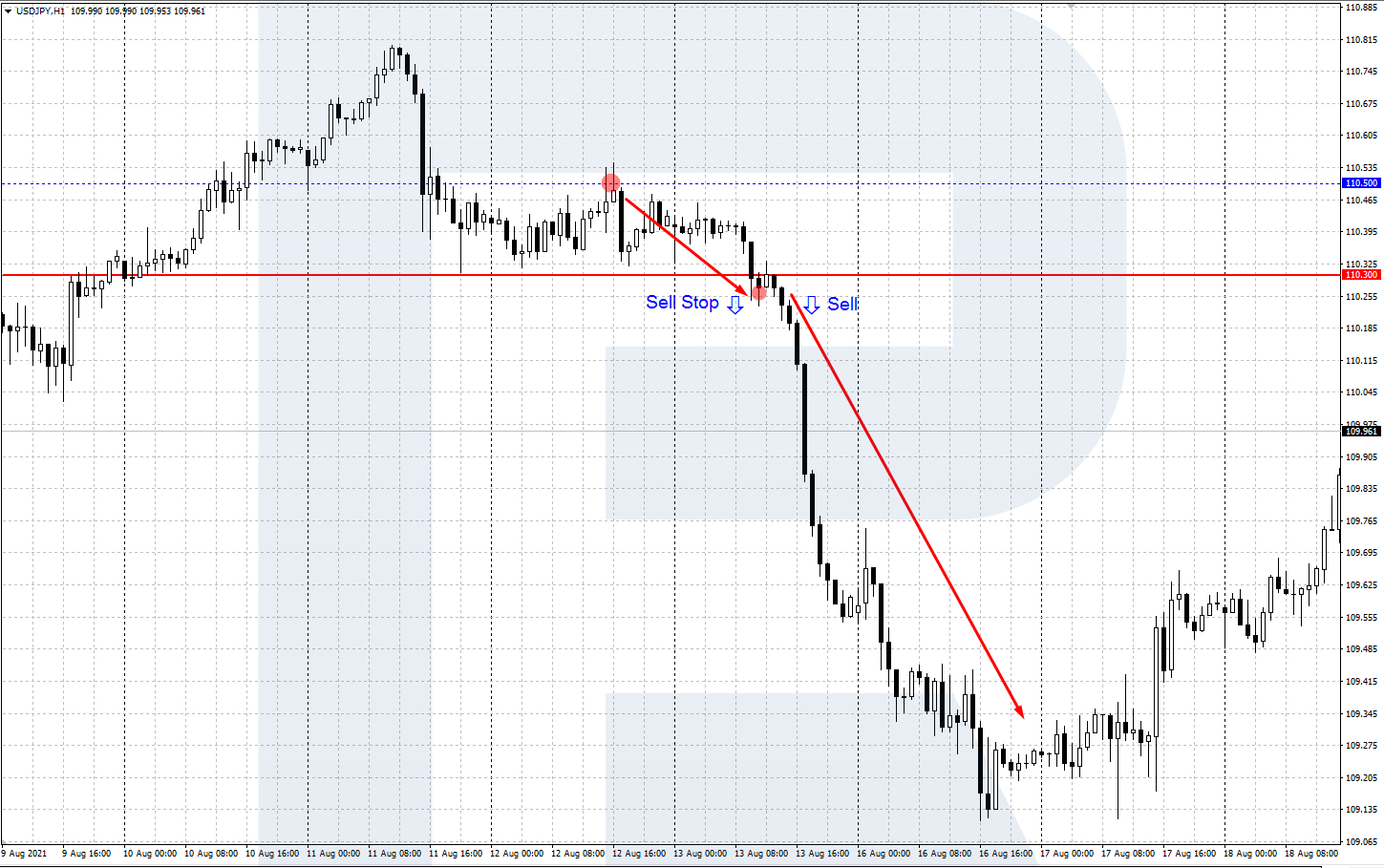
| Sell Stop | Below the current price | You expect a breakout of support and further decline | USD/JPY near 110.50, support 110.30, Sell Stop at 110.25 |
Pending Order vs Market Order
A market order opens a trade at once at the current price: a buy at the Ask, a sell at the Bid. A pending order waits for the price you set and opens the trade only when the market gets there. Use a market order when the signal is already on the chart and every pip of delay costs you. Use pending orders when the plan depends on a level the price has not reached yet, or when you cannot watch the screen.
| Feature | Market order | Pending order |
|---|---|---|
| Opens | At once | When the price reaches the level |
| Price | Current Ask or Bid | The level you set, or near it |
| Screen time | You enter by hand at the moment | The order waits for you |
| Can be cancelled | No, only closed | Yes, until it triggers |
| Suits | Signals that are already there | Bounces and breakouts of known levels |
A pending order also takes emotion out of the entry: you choose the level calmly in advance, and the order does not react to the noise of the moment.
Limit Orders to Open Positions
A limit order is an order to open a position at a specified or better price. For buying orders, the threshold is below the current market price, for selling orders it is above. Hence, limit orders are used when the trader expects the price to reach a certain level and then reverse.
Such orders are often used in strategies aiming at bounces off strong support and resistance levels. The peculiarity of limit orders is that they are executed at a price not worse than set. They can even be executed at a better price if the set level gets into a gap.
Trade on the Go With RoboForex MobileTrader
A portable trading workstation on your phone, on Android and iOS.
Buy Limit
Buy Limit is a pending order to buy at the Ask price below the current market price. This order is used when the trader expects the price to fall to a certain level where they plan to open a buying position. For example, if the GBP/USD price is 1.3880 but the trader wants to buy the pair at 1.3800, they need to place a Buy Limit at this level or slightly above it.
Sell Limit
Sell Limit is a pending order to sell at the Bid price above the current market price. This order is used when the trader relies on the growth of quotations to a certain level and plans to open a selling position there. For example, if EUR/USD is now near 1.1750, while the trader wants to sell the asset at 1.1800, they place a Sell Limit at this level or slightly below it.
Stop Orders for Opening Positions
Stop order is an order to open a market position as soon as the price reaches a specified level. An order to buy is placed at a price slightly above the current one, a selling order slightly below it. Stop orders are used when the trader expects the price to reach a certain level and go on in the same direction.
They are used in trading strategies that work with breakaways of levels. The peculiarity of this type of order is that as soon as the price reaches the specified level, they turn into a market one automatically.
If the market is calm at this moment, the order will be executed at the specified price. If there is a sharp price impulse (on some important news, for example), some slippage might occur, and the position will open at a price slightly worse than the one set.
Buy Stop
Buy Stop is an order to buy at the Ask price slightly higher than the current one. Upon triggering, the order opens a buying position at the level to which the price has grown.
Example:
AUD/USD quotations are at 0.7130. The trader expects the pair to continue growing if it breaks through the nearest resistance level of 0.7150. Slightly above this level (at, say, 0.7160) they place a pending Buy Stop order. When the Ask price reaches 0.7160, a buying position will open.
Sell Stop
Sell Stop is an order to sell at the Bid price below the current market price. Being triggered, the order opens a selling position at the level that the price has reached declining.
Example:
USD/JPY quotations are near 110.50. The trader expects that the pair will keep declining if it breaks through the support level of 110.30. They place a pending Sell Stop order a bit lower than that (say, at 110.25). As soon as the Bid price reaches 110.25, a selling position opens.
Start Trading Now
Forex, stocks, indices and gold on MetaTrader 4 and MetaTrader 5, from a free demo account to a live one.
When a Pending Order Triggers
A pending order triggers when the right side of the quote touches its price. Buy Limit and Buy Stop open on the Ask, Sell Limit and Sell Stop on the Bid. MetaTrader charts are drawn on the Bid, so a buy order can stay pending even when the candle seems to touch its level: the Ask sits higher by the spread and has not reached the price yet. Turn on the Ask line in the chart properties to see both prices.
Four more things decide the moment of execution:
- Expiry. An order with an expiry date is deleted at that time if the price has not reached it.
- Distance from the price. A pending order has to sit a minimum number of points away from the current price, set by the instrument's specification. Closer than that, the terminal will not accept it.
- Free margin. The position opens only if the account has enough free margin at the moment of triggering.
- Gaps and trading hours. Orders trigger only while the instrument trades. After a weekend gap, a limit order can fill at a better price and a stop order at a worse one.
Placing Pending Orders in the Terminal
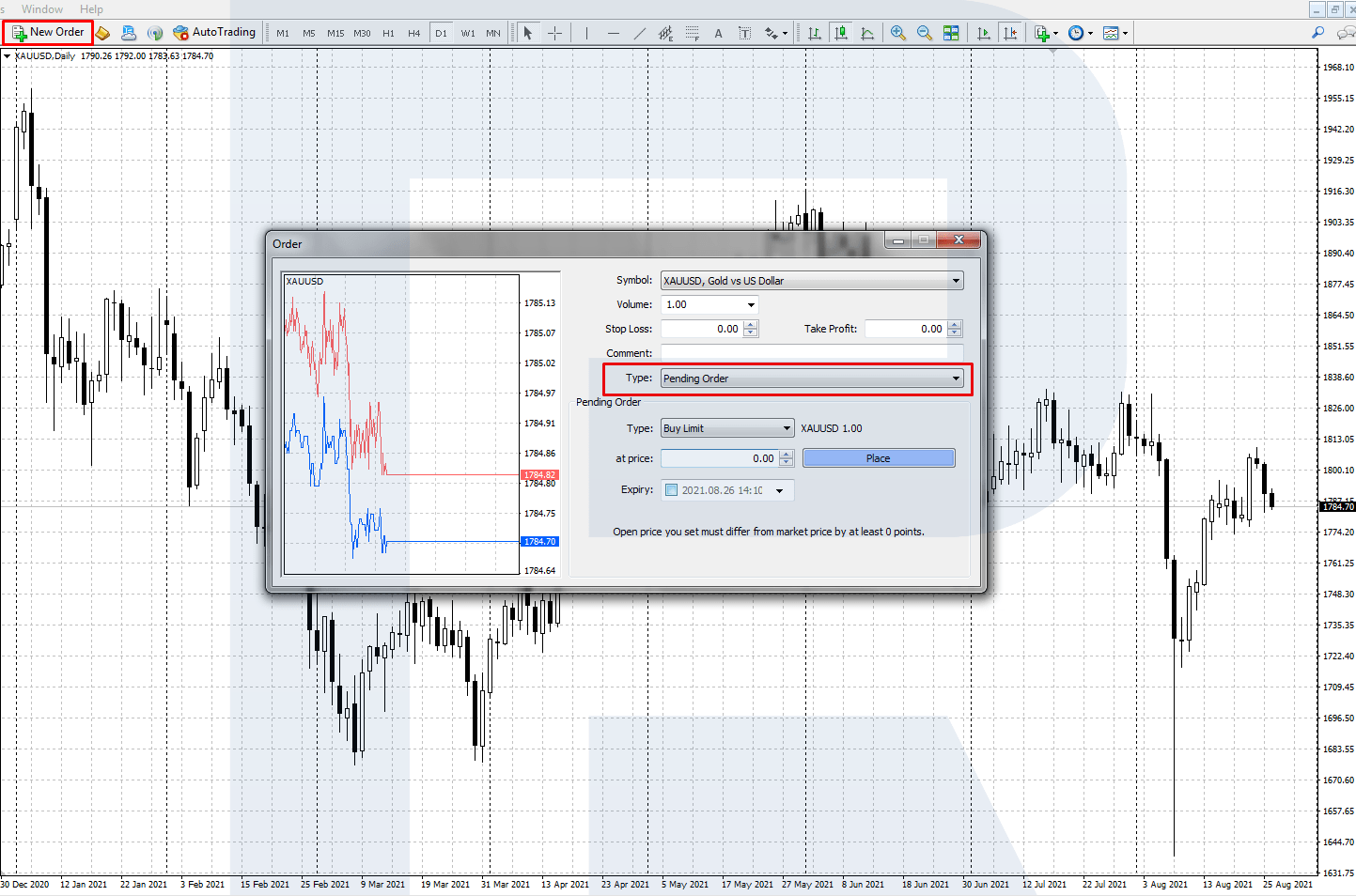
To place a pending order in a popular MetaTrader 4 trading terminal, open New Order via the Main Menu or a button on the desktop.
In Order Type choose Pending, then choose between a Buy Limit, Buy Stop, Sell Limit, and Sell Stop. Then specify the opening price and the order expiry date, if needed. Then click Place Order.
Your order will be placed and executed by the broker as soon as the price reaches the specified level. You can also add closing orders at once: a Stop Loss and a Take Profit. In this case, your position will both open and close (by SL or TP) on its own.
Closing Thoughts
Pending orders are good helpers for some traders and cannot just be replaced for others. They help execute many strategies, limit losses, and take profits.
A trader may even not look at the market if they placed correct pending orders beforehand (though always controlling risks). Planned positions will open or close automatically as soon as the price reaches the set level.
FAQ
What is a pending order in forex?
An order to open a trade later, when the price reaches a level you set. Until then nothing opens. The four types are Buy Limit, Sell Limit, Buy Stop and Sell Stop.
What is the difference between a Buy Limit and a Buy Stop?
A Buy Limit sits below the current price and buys after a fall, for a bounce off support. A Buy Stop sits above the current price and buys after a rise, for a breakout of resistance.
What is the difference between a Sell Limit and a Sell Stop?
A Sell Limit sits above the current price and sells after a rise, for a turn down from resistance. A Sell Stop sits below the current price and sells after a fall, for a breakout of support.
Can I cancel a pending order?
Yes, at any time before it triggers. In MetaTrader 4, right-click the order in the Trade tab and choose Modify or delete order. You can also set an expiry date so the order is deleted on its own.
Should I add a Stop Loss to a pending order?
Yes. Set the Stop Loss and Take Profit in the same window when you place the order. The position then opens and closes on its own, even if you are away from the terminal.
Any information provided in articles on this website is based solely on the personal opinions of the authors. These articles should not be construed as trading recommendations or a call to action. The authors and RoboForex accept no responsibility for the results of any trades made on the basis of these recommendations and reviews. Past performance is not indicative of future results. Trading stocks and CFDs involves a high risk of capital loss.