How to Use Stop Loss and Take Profit: Placing Orders on the Chart

Stop loss and take profit are the two orders that close a trade automatically: the stop loss at the price where the loss reaches the limit you accept, the take profit at the price where you lock in the planned gain. You place both when you open the position, following your strategy and the share of the deposit you can risk. A stop loss behind the nearest swing high or low, with a take profit at least three times as far away, gives a risk reward ratio of 1:3.
TL;DR
- Decide how much of the deposit you can lose in one trade, then place the stop loss where your strategy shows the trade idea is wrong.
- Set the take profit at the nearest target level and skip trades with a risk reward ratio below 1:3.
- Size the position from the stop distance, then move the stop to breakeven or use a trailing stop as the price goes your way.
The Stop Loss and Take Profit orders act as insurance, being reverse orders in essence. If, for example, a pair was bought, when a Stop Loss or a Take Profit is triggered, a reverse trade (selling) is carried out, locking in profit (if the TP is triggered) or Loss (if the SL is triggered).
What Is Stop Loss and Take Profit
A Stop Loss (SL) is a protective order that limits possible losses of the trader in an open position. It automatically closes the trade when a certain level or amount of losses is reached. A Stop Loss is placed either to limit losses or to lock in profit. In the latter case the order is placed in the profitable area.
A Take Profit (TP) is an order locking in profit without the trader’s participation. The order automatically closes the trade when the price reaches a certain level.
Both Stop Loss and Take Profit must be placed in accordance with the trader’s strategy. For your trading to be stable and successful, these orders are obligatory. The Stop Loss minimizes losses and enhances risk management.
Almost all trading strategies include the use of a Stop Loss and/or a Take Profit. Each trader has their own criteria of money management (MM) that tell them how much they can afford to lose in each trade. This is the strategy telling where to place an SL and a TP.
Trade on the Go With RoboForex MobileTrader
A portable trading workstation on your phone, on Android and iOS.
How to Place a Stop Loss
The trader defines how much they can lose, according to the MM, if something goes wrong. The strategy tells them where the Stop Loss should be.
In practice, placing a stop loss takes two decisions. The first is where the trade idea stops working. For a sell, that is usually just above the high of the signal candle, the last swing high or a resistance level; for a buy, just below the matching low or support. The second is how much money that distance costs, which sets the size of the position. Add a small buffer beyond the level for the spread and ordinary price noise, because the market often touches an obvious level before it moves on. Then check the take profit: if the nearest target is closer than the stop, the trade does not pay for its risk. The table sums up the common ways to set the stop, and the examples below show two of them on the chart.
| Method | Where the stop goes | Plus | Minus |
|---|---|---|---|
| Signal candle | Beyond the high or low of the entry candle, such as a pin bar | Short and clear, allows a larger position | Ordinary noise can reach it |
| Swing high or low, fractal | Beyond the last swing extreme or fractal | Follows the structure of the market | Often far away, so the position is smaller |
| Support or resistance | A few points beyond the level | Easy to see and to justify | Many stops gather there, false breakouts hit them |
| Volatility (ATR) | 1.5 to 2 ATR from the entry | Adapts to how fast the instrument moves | Takes no account of chart levels |
| Fixed amount | At the distance that equals the planned loss | Simple, the loss is known in advance | Ignores the chart, the stop may sit in the middle of noise |
| Trailing stop | Follows the price at a set distance | Locks in profit as the trend runs | In MT4 the terminal must stay on; pullbacks can close the trade early |
Pin Bar Strategy: A Trade With a 3:1 Profit to Loss Ratio
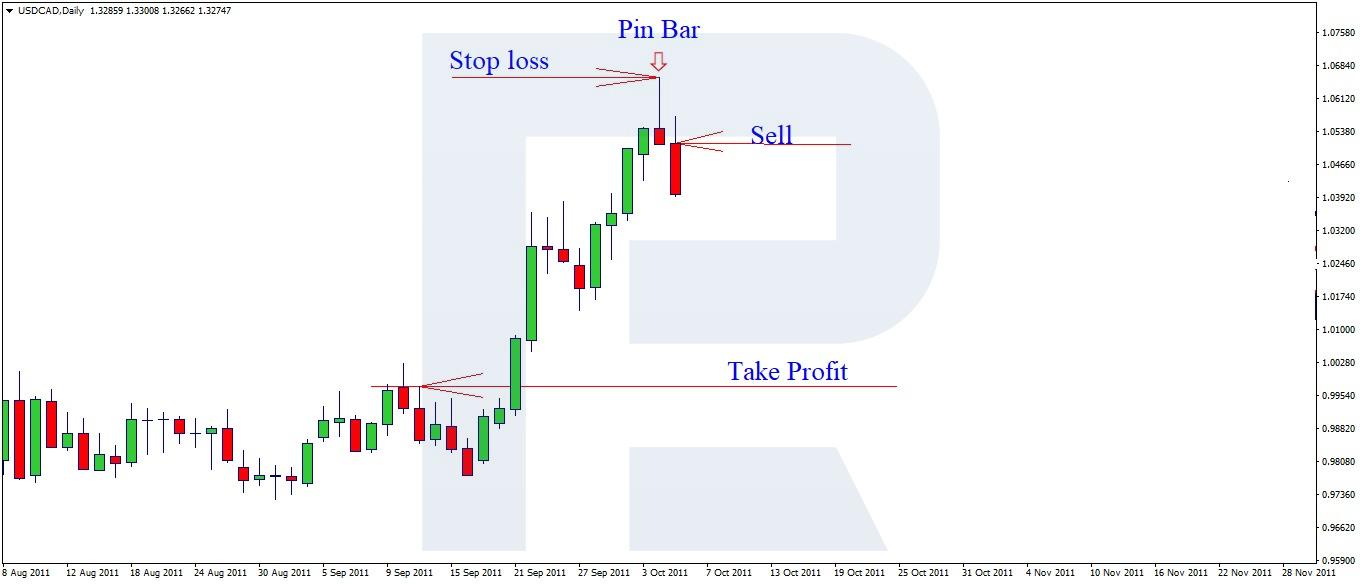
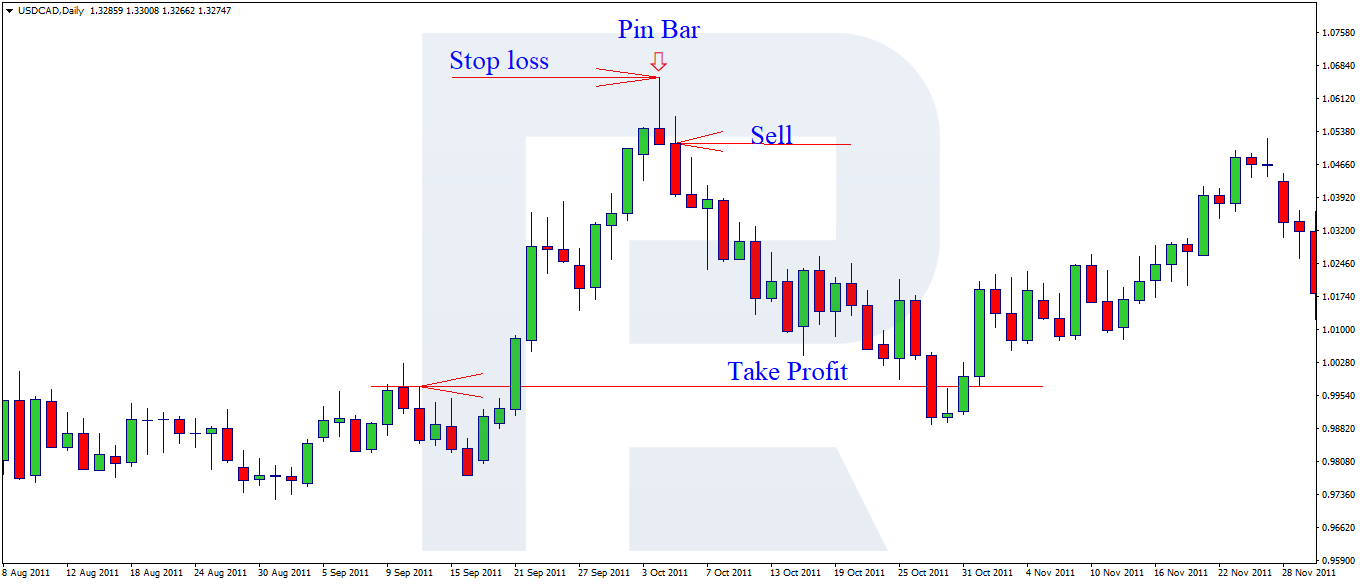
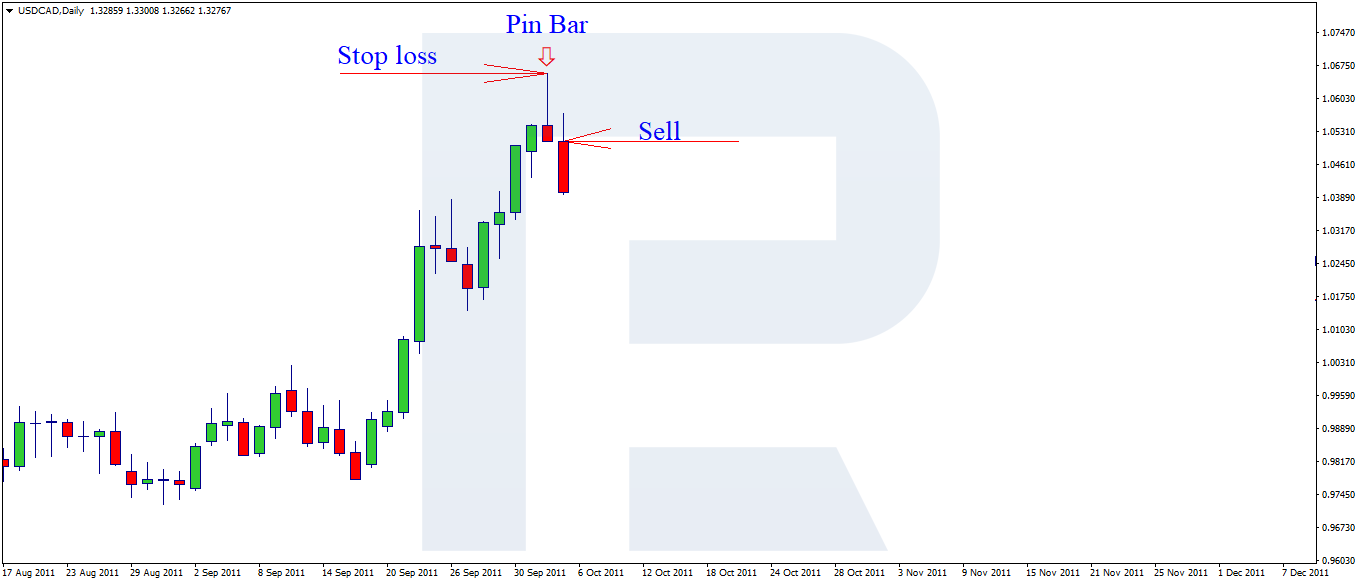
The trader is using the Pin Bar strategy. At the top of an ascending impulse, there has formed a Pin Bar pattern, and the trader is planning to open a selling trade. In this case, a Stop Loss will be placed behind the maximal value of the signal candlestick. The landmark for a Take Profit is the nearest support level. The possible profit to loss ratio in this case is 3:1. In the first picture, you can see where the SL and TP must be placed by the trading strategy.
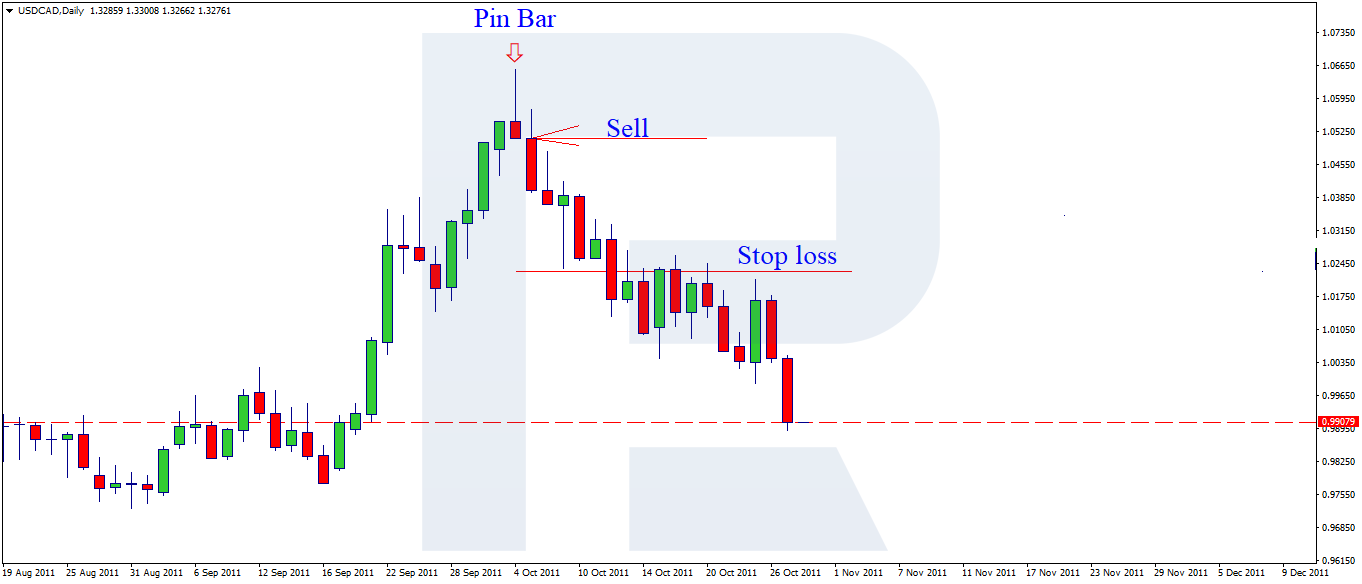
In the second picture, you see the result of the execution of the signal to sell.
The Stop Loss is usually calculated in points from the entry to the trade, accounting for the sum of affordable losses, expressed in the basic currency of the deposit. The trader must calculate the price of a point and then place the volume. For example, the Stop Loss is 40 points, the available loss is 100 USD; 100 USD/40 pips = the price of a point is 2.5 USD. Hence, the size of the trade is 0.25 lot.
With risk management, the trader can control risks. For example, if they receive a signal with a profit to loss ratio of 1 to 1, the trader should think twice before entering this trade. An optimal profit to loss ratio is no less than 3 to 1.
Pin Bar Strategy: Filtering Out a 1:1 Signal
In the picture, we can see a complete Pin Bar, and if we calculate the trade by the strategy, we will see that the nearest support level is as far away as the Stop Loss, which gives a 1:1 ratio. So, we can filter out this signal as it does not comply with the MM.
Placing a Stop Loss in the 2 MAs + Fractals Strategy
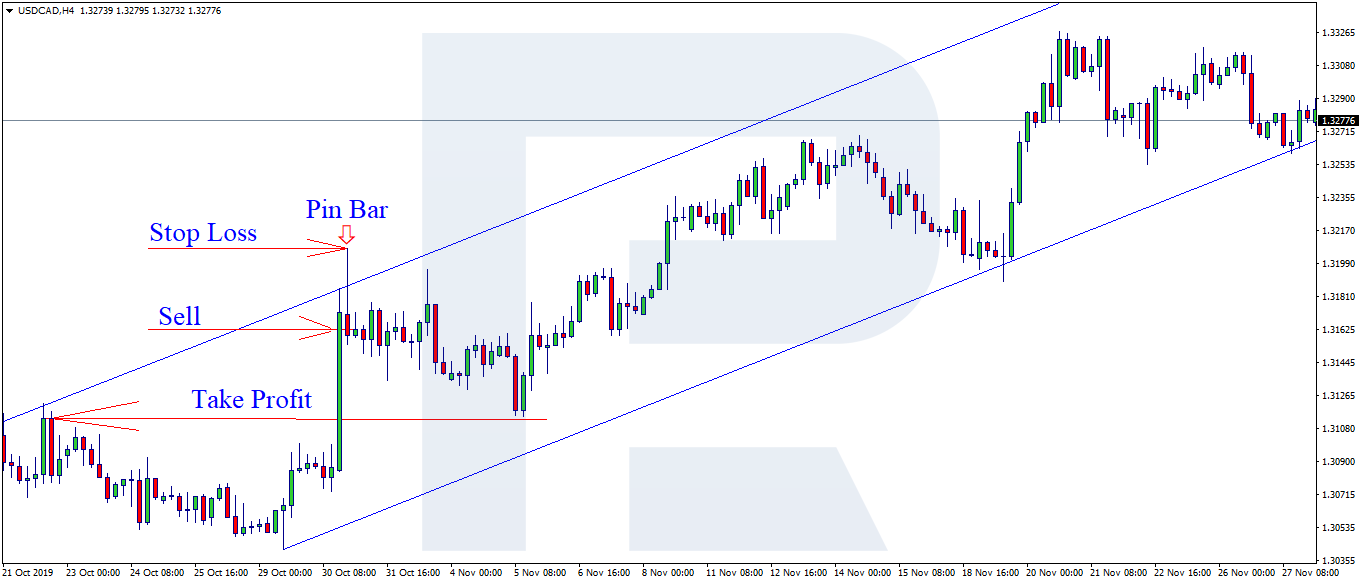
For the next example, let us take the simplest strategy based on two Moving Averages (MA) and Fractals. The trader receives a signal to sell after the two MAs cross; then, after a trade is open, a Stop Loss is placed. The target landmark for the SL here is the maximal fractal (thus you can ensure the trade from false breakouts and movements). The trade must be closed at the moment when the MAs cross in the opposite direction. As long as the place of the crossing is unknown at the moment of opening the position, the trader needs to move the Stop Loss manually, keeping it at a certain distance from the price.
The distance is calculated based on several facts:
- The timeframe on which the trade was entered
- The volume of the opened position
- The risk that the trader can afford in the trade
- The volatility of the instrument (with highly volatile pairs, a small SL will simply close the position before the trader gets the maximal profit).
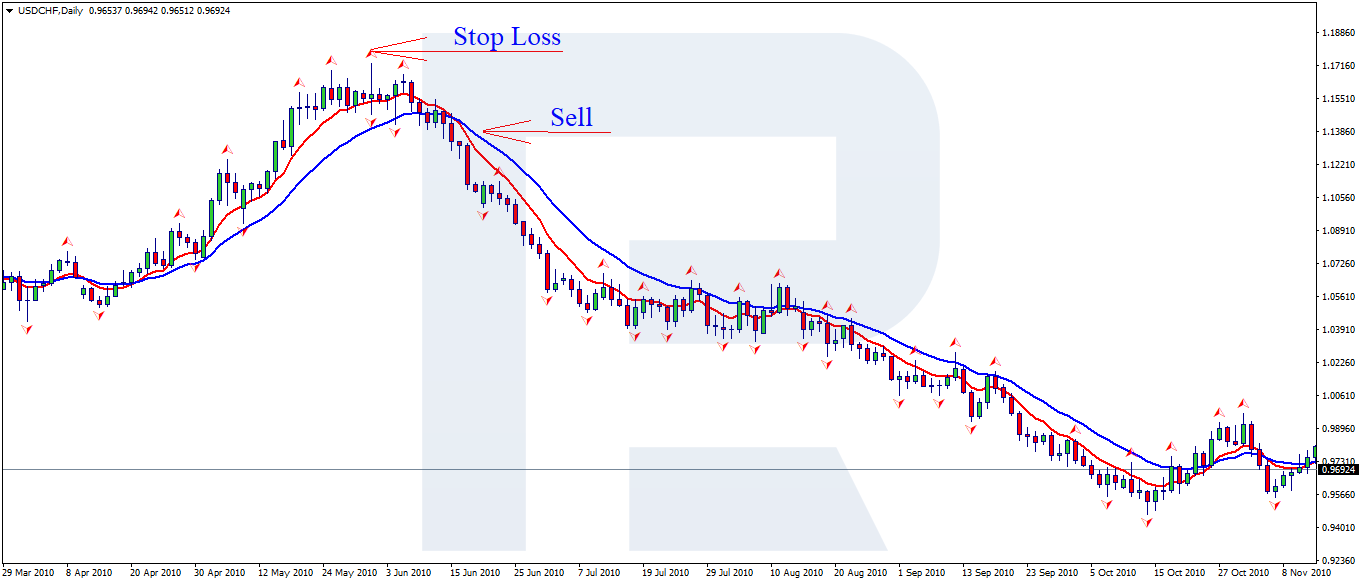
If there are doubts that the price will be able to go in the necessary direction at least 3 times farther than the distance to the Stop Loss, such a trade should better be skipped. You must never place an SL lower than planned due to a lack of funds or a wish to enter with a bigger volume as this may entail needless losses. The trade may be closed preliminarily, before the price goes in the necessary direction.
How Far to Place a Stop Loss
Place the stop loss far enough to sit beyond the level that proves the trade wrong, plus the spread and the normal noise of the instrument. A quick check is the Average True Range: a stop closer than one ATR of the timeframe you trade is likely to be hit by random movement. Only then work out the position size, never the other way round. Here is how it works on EUR/USD:
- Risk per trade. With a deposit of 5,000 USD and a risk of 2%, the trade may lose 100 USD.
- Stop distance. The pin bar high is 40 pips above the entry, so the stop loss goes there.
- Position size. One pip on 1 lot of EUR/USD is worth 10 USD, so 100 USD / (40 pips x 10 USD) = 0.25 lot.
- Take profit. For a risk reward ratio of 1:3, the target must be at least 120 pips away. If the nearest support is closer, skip the trade.
A wider stop means a smaller position for the same risk, and the loss stays at the planned 100 USD. The forex calculator shows the pip value for any instrument before you trade.
Start Trading Now
Forex, stocks, indices and gold on MetaTrader 4 and MetaTrader 5, from a free demo account to a live one.
How to Place a Trailing Stop
Trailing Stop is a function that automatically moves the Stop Loss after the price at a certain distance from it. In the MT4 terminal, this function is launched by right-clicking. Then you set the number of points for the Trailing Stop. As the profit in the open position grows, the SL will move automatically. Keep in mind that for the correct work of the Trailing Stop the terminal should be switched on.
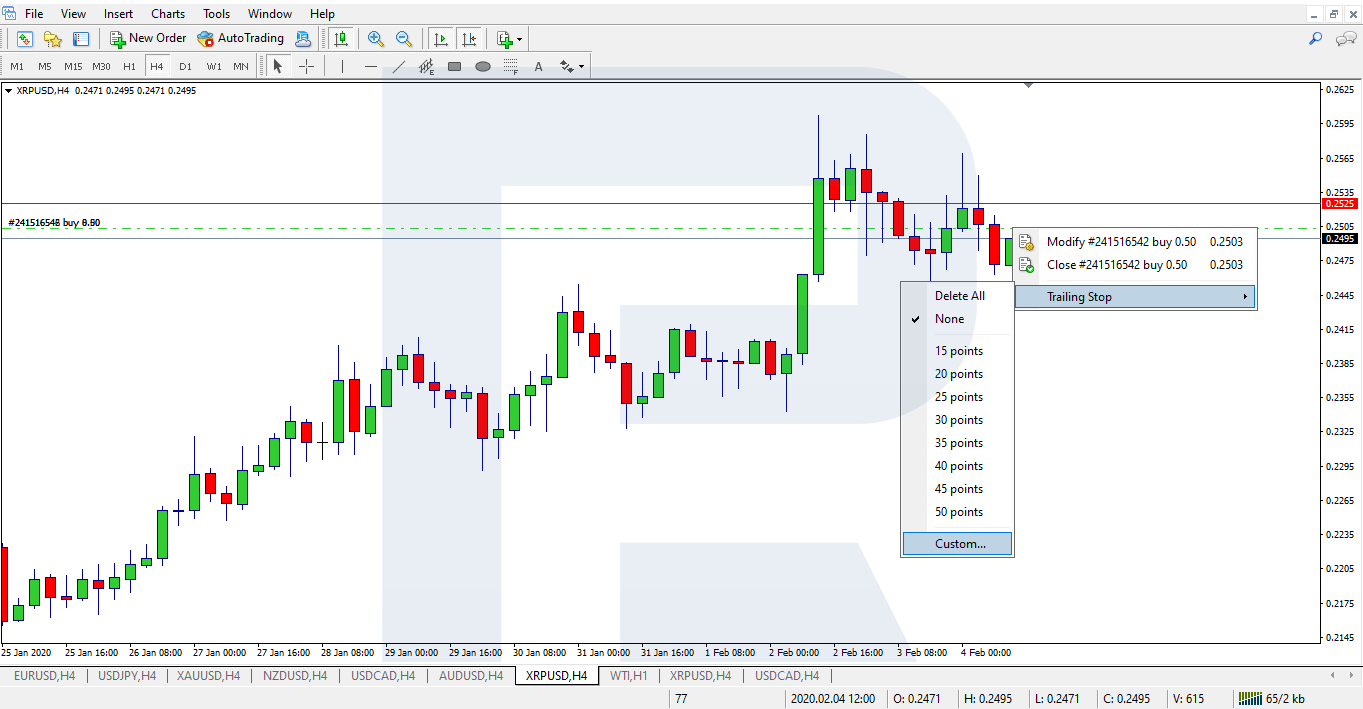
In contrast to the Stop Loss, the Take Profit is not so widely used. In such cases, the position is transferred to the breakeven. Transferring to the breakeven means placing the SL in the positive area, and if it is triggered, the position is closed with a profit, though we did not use a TP.
How to Place Stop Loss and Take Profit Automatically
At present, there are a lot of programs for the trader to live easier. While before the Stop Loss and Take Profit were to be placed manually, and if they were to be changed, the trader had to modernize the order in several steps, nowadays, the things have become much simpler. It is enough to left-click the order on the chart and drag it to the desired price level. Depending on the direction in which the order was moved, an SL or a TP will be placed.
There are scripts and expert advisors that automatically place the Stop Loss and Take Profit levels by the set criteria for each new order. On the Net, you can find an advisor called Auto-MM with a short user guide, which calculates the trade volume and automatically places the Take Profit and Stop Loss.
Set Stop Loss and Take Profit in MetaTrader 5
Drag SL and TP on the chart, trail your stops and test the rules on history in one free platform.
Bottom Line
Many traders neglect the Stop Loss. Trying to close the losing position manually, they start feeling pity for the trade and hoping that the market will reverse in the desired direction. As a rule, such actions lead to huge losses and drawdowns. Meanwhile, a correctly placed Stop Loss helps to limit losses by the level affordable according to the MM.
The use of the Take Profit prevents the trader from making more profit in certain cases. The reason for this is that it is placed at a short distance from the level where the position was opened and prevents the price from realizing its whole potential of movement. To use protective orders correctly, the trader should study their strategy well and make up their mind about the risks in the trade before they start working.
FAQ
What do SL and TP mean in trading?
SL is a Stop Loss, an order that closes a losing position at a set price. TP is a Take Profit, an order that closes a profitable position at a set price. Both work automatically, without the trader at the screen.
Where should I place a stop loss?
Beyond the level that proves the trade idea wrong: above the signal candle high, the last swing high or resistance for a sell, and below the matching low or support for a buy. Leave a small buffer for the spread and price noise.
What is a good risk reward ratio?
This article uses 1:3 as the minimum: the take profit at least three times as far from the entry as the stop loss. A 1:1 signal is usually filtered out, because a string of losses wipes out the gains.
Should I always use a take profit?
Not always. Some traders close by the strategy's exit signal or move the stop loss to breakeven and then trail it, so the position closes in profit without a take profit. A stop loss, by contrast, belongs in every trade.
How do I set stop loss and take profit in MT4?
Enter the levels in the Stop Loss and Take Profit fields of the New Order window, or add them later by right-clicking the position in the Trade tab and choosing Modify or delete order. You can also drag the order line on the chart to the price you want.
Any information provided in articles on this website is based solely on the personal opinions of the authors. These articles should not be construed as trading recommendations or a call to action. The authors and RoboForex accept no responsibility for the results of any trades made on the basis of these recommendations and reviews. Past performance is not indicative of future results. Trading stocks and CFDs involves a high risk of capital loss.