How to Launch a Trading Robot With AI: A Step-by-Step Guide for Beginners

27 minutes for reading
Building an automated trading system used to be out of reach for most private traders. Turning a trading idea into working code meant learning MQL4 or MQL5 from scratch, or hiring a developer with a real budget and a precise technical brief. In 2026, advanced language models removed that barrier completely. A modern AI model can now write a working trading robot in seconds from a plain text description, no coding background required. The entry point for algorithmic trading has dropped close to zero: the only skill left to master is describing a trading idea clearly, in your own words.
This guide walks through the full path in a handful of steps: from writing down a simple trading idea to running a fully automated robot that can trade around the clock.
In Brief
- The task: build, code, test, and launch an automated trading robot (Expert Advisor) using AI prompts.
- What is needed: a computer, access to an AI model such as ChatGPT, a trading terminal, and about half an hour of free time.
- Cost: free at every stage, from code generation to testing on historical data.
- The main result: routine execution is automated and emotional decisions are removed from the trading process.
What Is a Trading Robot and What Can It Do
A trading robot, or Expert Advisor (EA), is a program that plugs into a trading terminal and executes trades according to a predefined algorithm. It watches quotes on its own, looks for trading signals, opens positions, sets orders, and closes trades without further input.
A trading algorithm has no intuition and cannot predict the future. It is an executor: a tool that translates a trader's rules into a language a computer can run.
Main Advantages of Trading Robots
- Round-the-clock operation. A robot can track the market 24 hours a day, seven days a week, without missing overnight or early-morning signals.
- Strict discipline. A robot is immune to emotion. A string of losing trades will not push it to abandon the plan; it opens and closes positions strictly by the algorithm's rules.
- Instant reaction. Analyzing the market and opening a trade takes a program milliseconds, a speed that manual trading cannot match.
What You Need to Get Started
Launching a first trading robot does not require capital or specialized knowledge. The whole process runs on four tools, all of them free.
- A trading account. A demo or cent account with a broker is enough for safe testing.
- MetaTrader. The platform where the robot will run. A current version such as MetaTrader 5 is recommended.
- An AI model. Any capable model works, including ChatGPT or a comparable text-based assistant.
- A VPS (Virtual Private Server). Needed at the final stage, so the robot can run continuously without keeping a home computer switched on around the clock.
Get MetaTrader 5 From RoboForex
A free, professional platform for building, testing, and running your own trading robots.
Which Strategies Work Best With AI
Language models carry an enormous base of programming knowledge, but they are not infallible and can misread what a trader is actually asking for. The quality of the generated code depends directly on how complex the underlying strategy is. Before writing a first prompt, it helps to know which types of strategies AI handles reliably and which ones are better left for later.
✓ Strong Fit for AI
- Indicator-based systems. Strategies built on clear mathematical signals from one or two classic indicators, such as a moving average crossover, RSI leaving overbought or oversold zones, or a Bollinger Band touch. AI translates these rules into code with ease.
- Simple breakout strategies. Algorithms that react to price breaking a static support or resistance level, the previous day's high or low, or the boundary of a defined range.
- Basic mathematical models. Simple grid or averaging strategies where new trades open at a fixed price step. The AI itself will typically flag that these carry higher risk.
⚠ Better to Wait On
- Chart pattern recognition. Asking AI to independently spot subjective formations like Head and Shoulders or Elliott Waves on low timeframes.
- High-frequency trading. Systems where positions last a fraction of a second and execution requires a direct exchange API connection. This code is normally built by development teams and tuned to specific server hardware.
- News-based trading. Systems that need to read headlines, judge sentiment, and open trades within moments of a release.
For a first attempt at algorithmic trading with AI, the safest path is the simplest strategy with the least ambiguous logic. The clearer the entry and exit rules, the more stable and workable the code the model produces.
From Idea to Live Robot: The Full Process
The seven steps below cover the complete path: writing a strategy in plain language, generating and installing the code, testing it, and finally running the robot around the clock on a real account.
1
Formulate the Trading Strategy
AI acts only as an executor. It cannot invent a profitable trading system on its own, though it can offer useful suggestions. The quality of the future robot depends entirely on how precisely the trading logic is described. A phrase like "buy when the price drops a lot" means nothing to a program; it needs exact mathematical criteria.
A classic strategy based on two moving averages crossing is a solid choice for a first attempt. Here is a full description of the rules used as the example throughout this guide:
- Tools: two Exponential Moving Averages (EMA) applied to the closing price, a fast EMA with a 10-period setting and a slow EMA with a 20-period setting.
- Buy condition: the fast EMA (10) crosses the slow EMA (20) from below. The robot opens a buy trade at the close of the signal candle.
- Sell condition: the fast EMA (10) crosses the slow EMA (20) from above. The robot opens a sell trade at the close of the signal candle.
- Position size: fixed at the minimum tradable lot of 0.01.
- Stop-loss: fixed at 200 points from the entry price.
- Take-profit: fixed at 400 points from the entry price.
- Open trades: only one position at a time; the robot ignores new signals while a trade is already active.
EMA Strategy Calculator
Enter an entry price to see the exact Stop-Loss and Take-Profit levels this strategy would use.
Stop-Loss · 200 pts —
Risk : Reward 1 : 2
Take-Profit · 400 pts —
Buy: Stop-Loss below entry, Take-Profit above entry.
2
Generate the Robot's Code With AI
Once the rules are written down, the description goes to the AI model. To get correct, error-free code, the request works best as a structured, step-by-step prompt rather than a loose description.
The template below is ready to copy and send to an AI assistant such as ChatGPT or a similar text-based model:
Ready-to-use AI prompt
Write the code for a trading robot (Expert Advisor) for the MetaTrader 5 terminal in MQL5.

The robot must strictly follow these rules:
1. Use two Exponential Moving Averages (EMA) applied to the closing price.
2. The fast EMA period is 10, the slow EMA period is 20.
3. Buy entry: when the fast EMA (10) crosses the slow EMA (20) from below. Open the position at the close of the signal candle.
4. Sell entry: when the fast EMA (10) crosses the slow EMA (20) from above. Open the position at the close of the signal candle.
5. Every trade must use a fixed volume of 0.01 lot.
6. Stop-loss for every trade is 200 points from the entry price.
7. Take-profit for every trade is 400 points from the entry price.
8. Only one position may be open in the market at a time. While a trade is active, new crossover signals must be ignored completely.
The AI model will return ready-to-use code in response. Use the copy button inside the reply window, or select the code and copy it manually, to move it to the trading terminal. The only rule that matters here is copying the code itself, with no extra words or symbols attached.
3
Install the Robot in MetaTrader 5
To move the generated code into the platform and create the robot's file:
- Open the code editor. In the MetaTrader 5 top menu, go to Tools → MetaQuotes Language Editor.
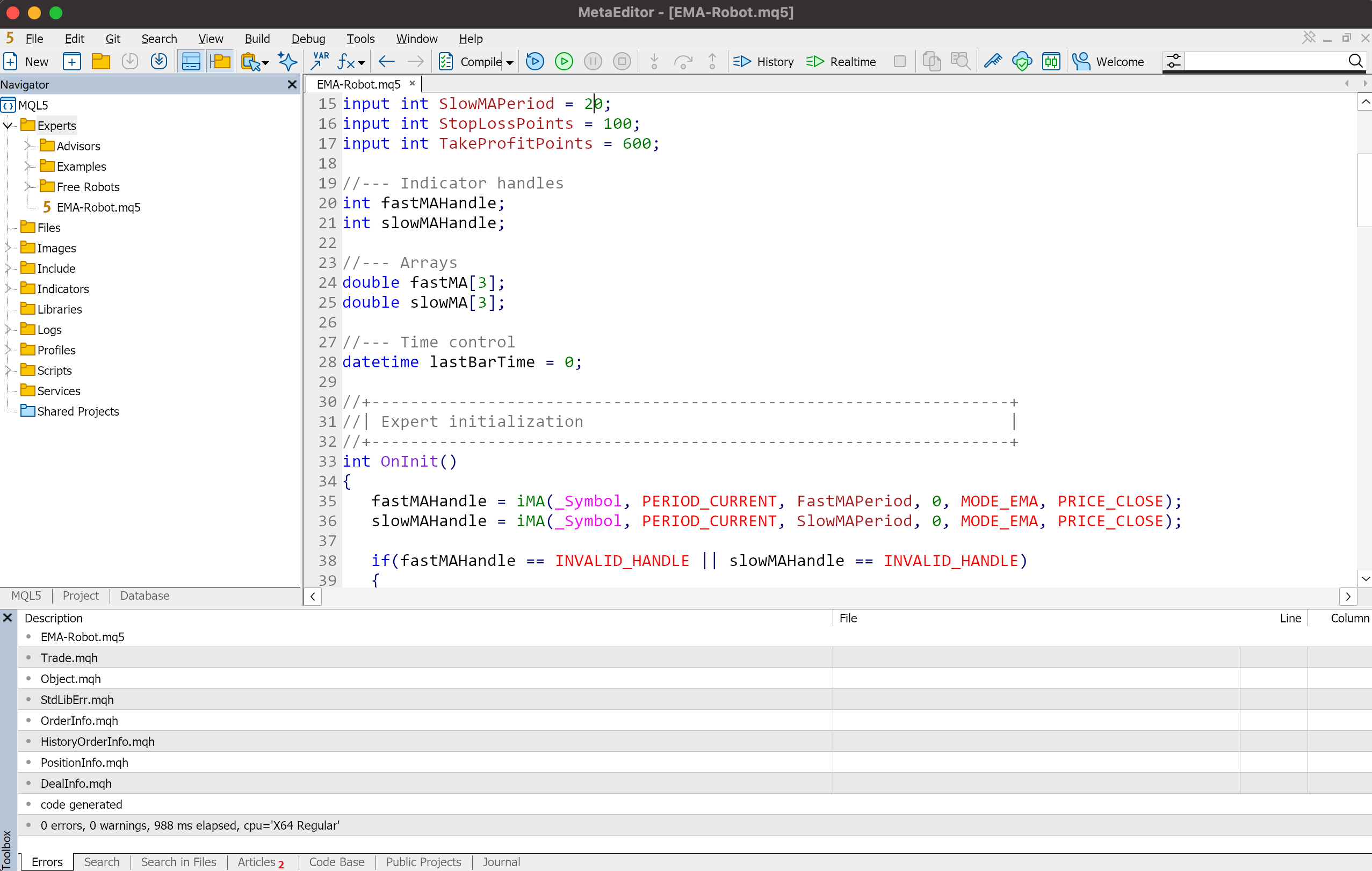
- Create a new file. In MetaEditor, click New in the top-left panel. In the creation wizard, choose Expert Advisor (template) and click Next. Enter a name, for example EMA-Robot, click Next, then skip the remaining steps and click Finish.
- Paste the code. Delete all the default template text and paste the MQL5 code copied from the AI model in its place.
- Compile the robot. Click Compile on the top toolbar. The terminal checks the code for errors. A successful build shows "0 errors, 0 warnings" in the Errors panel at the bottom.
Once compiled, MetaEditor can be closed. The new robot appears automatically in MetaTrader 5, in the Navigator panel under Expert Advisors.
4
Backtest the Robot on Historical Data
Before trading with the new Expert Advisor, its behavior needs to be checked against historical data. This confirms that the code runs without errors and that the strategy produces a reasonable result. MetaTrader 5 has a built-in Strategy Tester for exactly this purpose.
- Open the tester. In the top menu, go to View, then Strategy Tester.
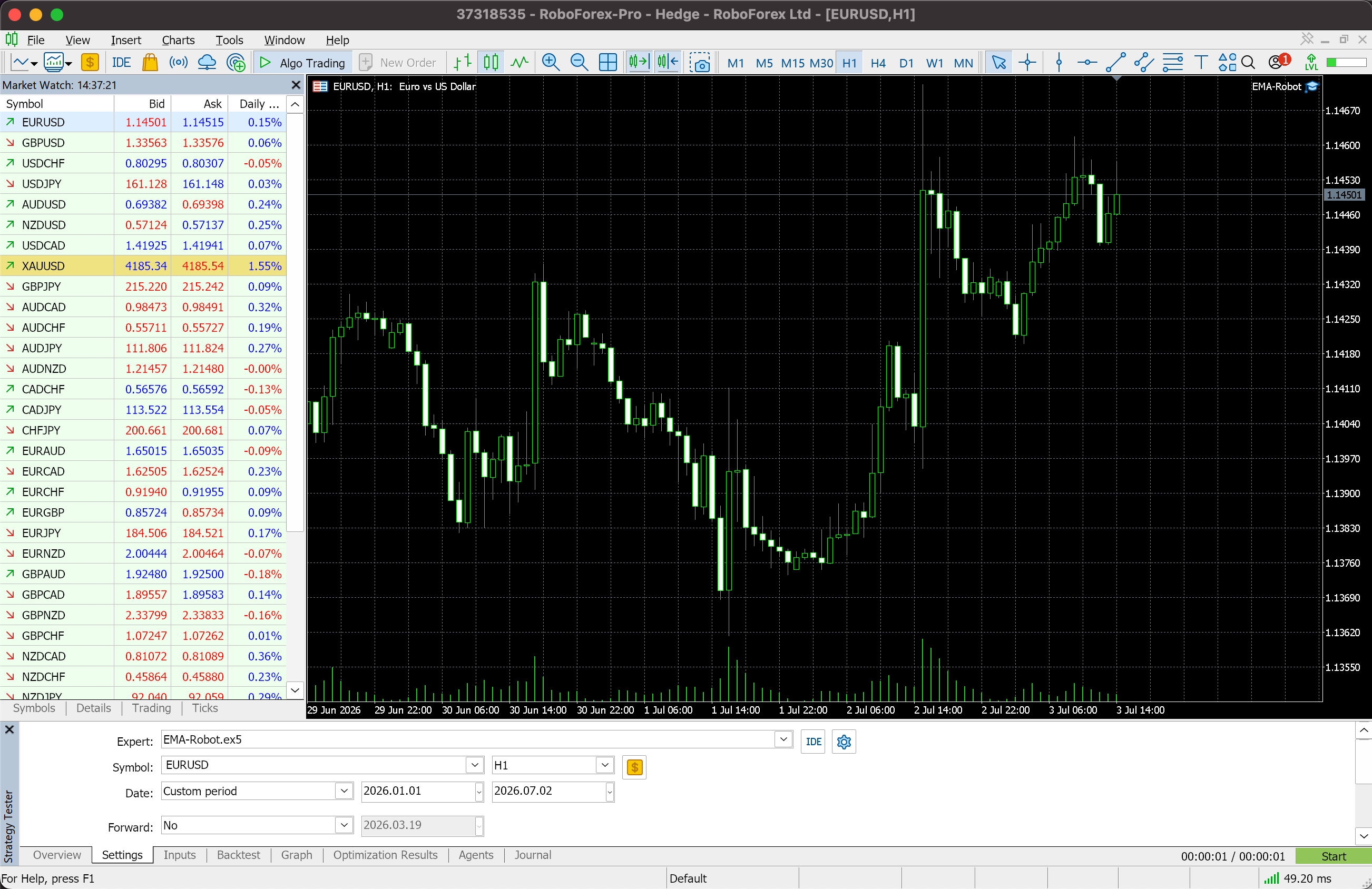
- Choose the settings. In the Settings tab, select the EMA-Robot in the Expert Advisor field. Set the Symbol, for example EURUSD, and the Timeframe, for example H1.
- Set the test period. Choose a historical range to test against, for example the last year, the full available history, or a custom period.
- Run the test. Click Start in the bottom-right corner. The terminal runs the algorithm through historical quotes, simulating real trading conditions.
Once the test finishes, the Chart tab shows the balance curve, and the Backtest tab shows a full report, including profit, the share of winning trades, maximum drawdown, and the number of long and short positions, among other data.
5
Run the Robot on a Demo or Cent Account
Even a strong result on historical data does not guarantee live performance, since market conditions constantly shift. The next required step is running the robot on a demo or cent account.
- Demo account. An ideal environment for confirming the robot works correctly. Trading uses virtual funds, so there is no financial risk, while the accuracy of position opening and closing can be checked in full.
- Cent account. A transition step before trading with meaningful capital. Balances on this type of account are shown in cents; for example, a 100 USD deposit appears as 10,000 cents. This allows the robot to run under real execution conditions while exposing only a minimal amount of money.
To launch the robot: open the Navigator panel, select the Expert Advisors tab, find the robot in the list, and drag it onto an open chart. In the settings window that appears, on the Common tab, make sure the "Allow algorithmic trading" box is checked. Then, on the terminal's top toolbar, click the Algo Trading button so it turns green; a robot icon with an active cap appears in the top-right corner of the chart, confirming the robot is running.
6
Connect a VPS for 24/7 Operation
For a robot to work reliably, the MetaTrader terminal has to stay running at all times. Keeping a home computer on around the clock carries real risks: an internet outage, a power cut, or the machine simply going to sleep. A VPS solves this.
A VPS, or Virtual Private Server, is a dedicated server hosted in a data center. It runs continuously, without pauses or restarts, keeping the connection to the market open at all times.
7
Move to a Real Account
Once the robot has passed testing on historical data, shown stable results on a demo account for several weeks, and run on a cent account through a VPS, it is ready for the transition to real trading.
- Increase capital gradually. Start with a conservative deposit, an amount small enough that losing it would not meaningfully affect your overall finances.
- Use the minimum lot. Keep the robot's trade volume at the smallest available size for the first live run. Increase it only after building a track record over several months.
- Monitor the robot closely. The first days on a real account call for close attention. Check every trade the robot opens against the strategy's rules to catch any malfunction early.
Laid out in order, the path from a tested idea to a live, autonomous robot follows a fixed sequence. Each stage builds confidence for the next one.
1
Backtest
Run the robot on historical data. No capital at risk.
2
Demo Account
Confirm the logic works with virtual funds.
3
Cent Account
Real execution conditions, minimal money exposed.
4
VPS Connected
The robot moves to 24/7 hosting.
5
Real Account
Live trading, starting at the minimum lot.
Home Computer vs VPS
| Comparison | Home Computer | VPS |
|---|---|---|
| Uptime | Cannot stay on for weeks without wear, noise, and high power use. | Runs autonomously 24/7 under continuous monitoring in a data center. |
| Network stability | Exposed to internet outages, provider issues, or slow connections. | Backed by redundant, high-speed connections with continuous uptime. |
| Power supply | A voltage spike or scheduled outage shuts the computer and terminal down instantly. | Industrial backup power and generators protect against outages. |
| Execution speed | Higher latency, since the home computer sits far from the broker's servers. | Minimal ping when hosted close to the broker, speeding up order execution. |
| System risk | OS freezes, accidental terminal closure, or forced restarts during updates. | Fully isolated environment configured only for uninterrupted trading. |
Open a Trading Account at RoboForex
Demo and cent accounts for safe testing, swap-free options, and execution built for automated strategies.
What a Robot Does Better Than a Human
Automating a trading process closes off a number of weaknesses that come with manual trading. Program-based execution brings a set of fundamental advantages that make it a reliable executor of a trading strategy.
| Factor | Human Trader | Trading Robot |
|---|---|---|
| Emotional impact | Exposed to fear and greed, which can lead to impulsive trades made to recover losses. | Fully shielded from emotion. Opens and closes positions strictly by the rules. |
| Work schedule | Needs rest and sleep, and fatigue erodes focus over time. | Runs 24/7, continuously scanning quotes without missing night or morning signals. |
| Reaction speed | Spends time reading the chart and entering order parameters, which can mean missing good trades. | Reacts in milliseconds, reading indicators across many instruments and executing instantly. |
| Calculation accuracy | Can miscalculate lot size or mistype an order level. | Sets stop-loss and take-profit levels with mathematical precision, exactly by the rules. |
Where a Trader’s Control Still Matters
Despite its clear strengths, a trading robot is still only an executor with no flexibility or judgment of its own. Handing over trading entirely, with no human oversight at all, can turn into a costly mistake. A few factors still call for a trader's attention.
- Economic events. Robots built on technical analysis do not account for major fundamental releases, such as central bank meetings or CPI and employment reports. Volatility spikes sharply around these events, so the decision to pause the algorithm temporarily has to come from the trader.
- Shifting market phases. Any strategy performs well only in the market condition it was built for. A moving-average system, for example, works well in a trending market but produces many false signals once the market turns sideways. A robot cannot recognize that shift on its own; the trader has to spot it and adjust the settings or pause trading in time.
- Infrastructure monitoring. An Expert Advisor's performance depends on stable external conditions. Checking the VPS is online, confirming the terminal has not frozen, and verifying the robot is running correctly all remain part of the trader's job.
Ready to Go Live?
Before committing real capital, run through the checklist below. It brings together the safeguards covered in the steps above.
0 of 7 checked
Common Beginner Mistakes
Launching a trading robot with AI is a simple process today, but it can still lead to losses if expectations are unrealistic or basic risk rules get ignored. Beginner algo-traders tend to run into the same handful of issues.
- Chasing guaranteed signals. Trying to build or find an algorithm that wins 100% of its trades. Systems like this do not exist. The goal of automation is a consistent statistical edge over time, where total gains outweigh total losses.
- Over-optimizing on historical data. A common testing mistake, where a robot's settings are tuned so tightly to past data that the backtest curve looks flawless. A robot fitted this closely to old price action can still lose money live, since it is built for movements that already happened and cannot adapt to new conditions.
- Using risky money-management models. Running robots that double the lot size after every loss. During a sharp, sustained move without a pullback, this kind of system can wipe out a deposit within minutes. Manually overriding a running robot, closing trades by hand, moving stop-losses, or shutting it down out of fear after a losing streak, undoes every advantage automation was meant to provide.
- Trading an oversized lot from day one. Running untested code directly on a large real account. A safe approach means completing the full sequence: backtest, then demo account, then a minimum lot on a cent account, in that order.
Conclusion
AI has removed the technical wall that once stood between complex programming and independent traders. Building a trading robot today comes down mainly to discipline and the ability to describe a trading strategy's rules with precision. The AI model works as an assistant that turns a clear idea into working code, while the trader still owns the strategy itself, the testing process, and every risk decision along the way.
Traders who follow the full launch sequence step by step, complete every testing stage, use cent accounts before scaling up, and stay on top of risk, put themselves in a strong position as algorithmic trading becomes more accessible.
Frequently Asked Questions
Do I need programming knowledge to build a trading robot with AI?
No. The whole process is based on describing a strategy in plain language and passing that description to an AI model, which generates the code. Basic familiarity with the MetaTrader interface is useful for installing and testing the robot, but writing code by hand is not required.
Which AI model works best for generating MQL5 code?
Any current general-purpose language model with strong coding ability can handle a well-described strategy, including ChatGPT and comparable text-based assistants. Result quality depends far more on how clearly the strategy rules are written than on the specific model chosen.
Is it safe to run an AI-generated robot on a real account right away?
No, a new robot should always go through backtesting, a demo account, and a cent account first. Skipping these stages and moving straight to a real account with meaningful capital is one of the most common and costly mistakes beginners make.
How much does it cost to build and run a trading robot?
The process described in this guide is free at every stage, from generating the code to testing it on historical data and running it on a demo or cent account. The only recurring cost that may apply later is VPS hosting, once a robot moves to live, continuous trading.
Can AI create a strategy that is guaranteed to be profitable?
No. AI can write functioning code for a strategy a trader defines, but it cannot guarantee trading results, and no strategy wins every trade. The purpose of a well-built robot is a consistent statistical edge over time, not a system free of losing trades.
* The information in this article is provided for educational purposes only. It should not be construed as trading advice or a call to action. The authors and RoboForex bear no responsibility for trading results based on the information contained in this material. Past performance, including results of historical backtesting, is not a guarantee of future results. Trading CFDs and using automated trading systems involves a high risk of capital loss.