Automated Trading Strategies: How to Turn Your Idea Into Rules a Robot Can Execute

Automated trading strategies are sets of exact rules that an Expert Advisor (EA), a trading robot in MetaTrader 5, follows to open, manage and close trades without manual input. This guide shows which strategy types are easiest to automate and how to write your own idea as five blocks of rules, ready to hand to a developer or ChatGPT.
TL;DR
- Systems with clear signals from standard MT5 indicators, such as moving averages and Bollinger Bands, are the easiest to automate.
- A robot needs five blocks of rules: entry, exit, stop loss, trading filters and position size, each written with numbers.
- The rules template below turns your idea into a brief for a programmer or a prompt for ChatGPT.
What Is an Automated Trading Strategy?
An automated trading strategy is a step-by-step algorithm that opens, manages and closes trades by itself when preset conditions are met. The program has no opinion, intuition or feel for the chart. It runs only the logic it was given, and each change in price or in an indicator triggers one defined action.
A manual trader can miss a signal through tiredness, doubt or emotion. A robot follows its rules whenever the market is open, as long as the terminal keeps running on your computer or on a VPS. The price of that discipline is precision at the start: every rule has to be written out in full before the robot can use it. If even one condition is vague, the EA cannot make a decision or opens trades you never intended.
Which Trading Strategies Can You Automate?
Strategies whose entries and exits come from formulas, indicator readings or fixed price levels are the easiest to automate. Approaches built on a subjective reading of chart patterns are the hardest to put into code. Three types cover most first robots. For manual systems to compare them with, see 7 Effective Trading Strategies for Beginners and Advanced.
Trend Following
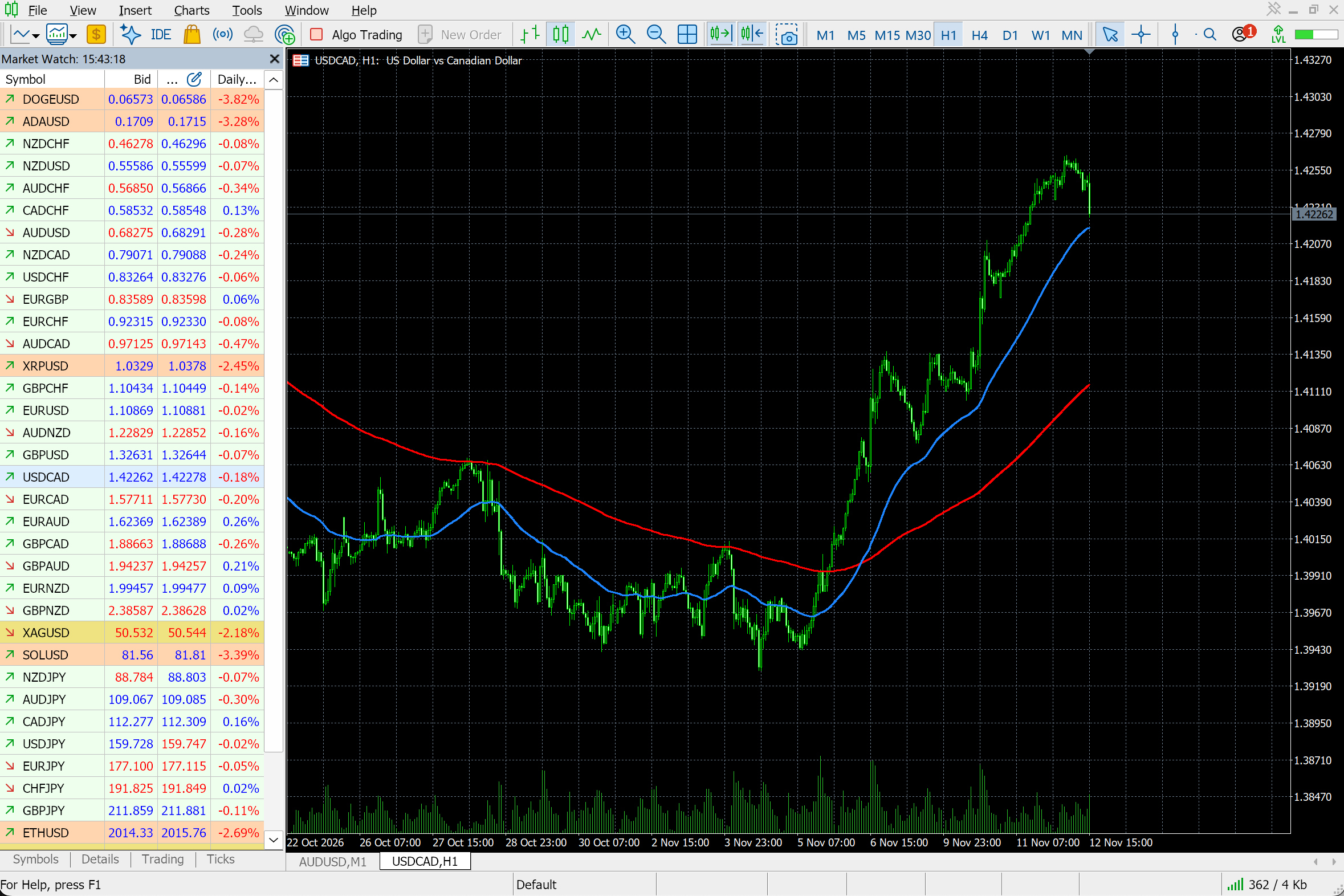
Trend strategies identify a directional price move and enter in the direction of that move. The classic automated example is a crossover of two exponential moving averages (EMA) with different periods, such as EMA 50 and EMA 200. When the shorter-period line crosses the longer-period line from below, the EA opens a buy. On the opposite crossover it closes the position or opens a sell. This approach translates into code easily because every signal comes from indicator values.
Mean Reversion
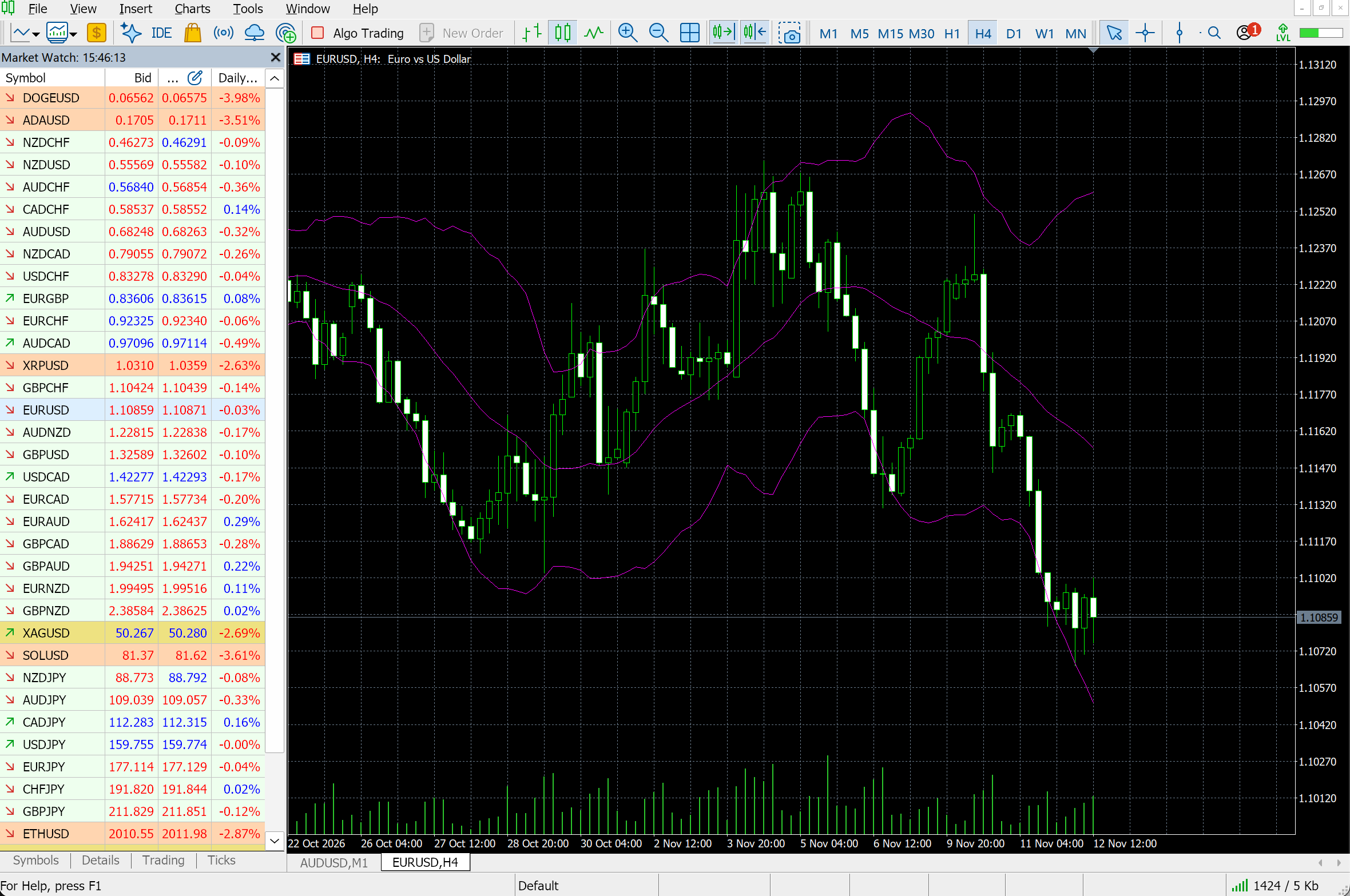
Mean reversion strategies assume that after a strong deviation the price may return to its average. Bollinger Bands are a common way to find these moments. If a candle closes above the upper band and a later candle closes back inside the bands, the algorithm can open a short position and close it when the price reaches the middle line of the indicator. The buy signal is the mirror image: a close below the lower band, then a later close back inside, a long position and an exit at the middle line. In a strong trend the price can stay outside a band for many candles, so a trend filter often sits next to this rule. More on the approach is in Creating Trading Strategies Based on Mean-Reversion and Momentum.
Breakout
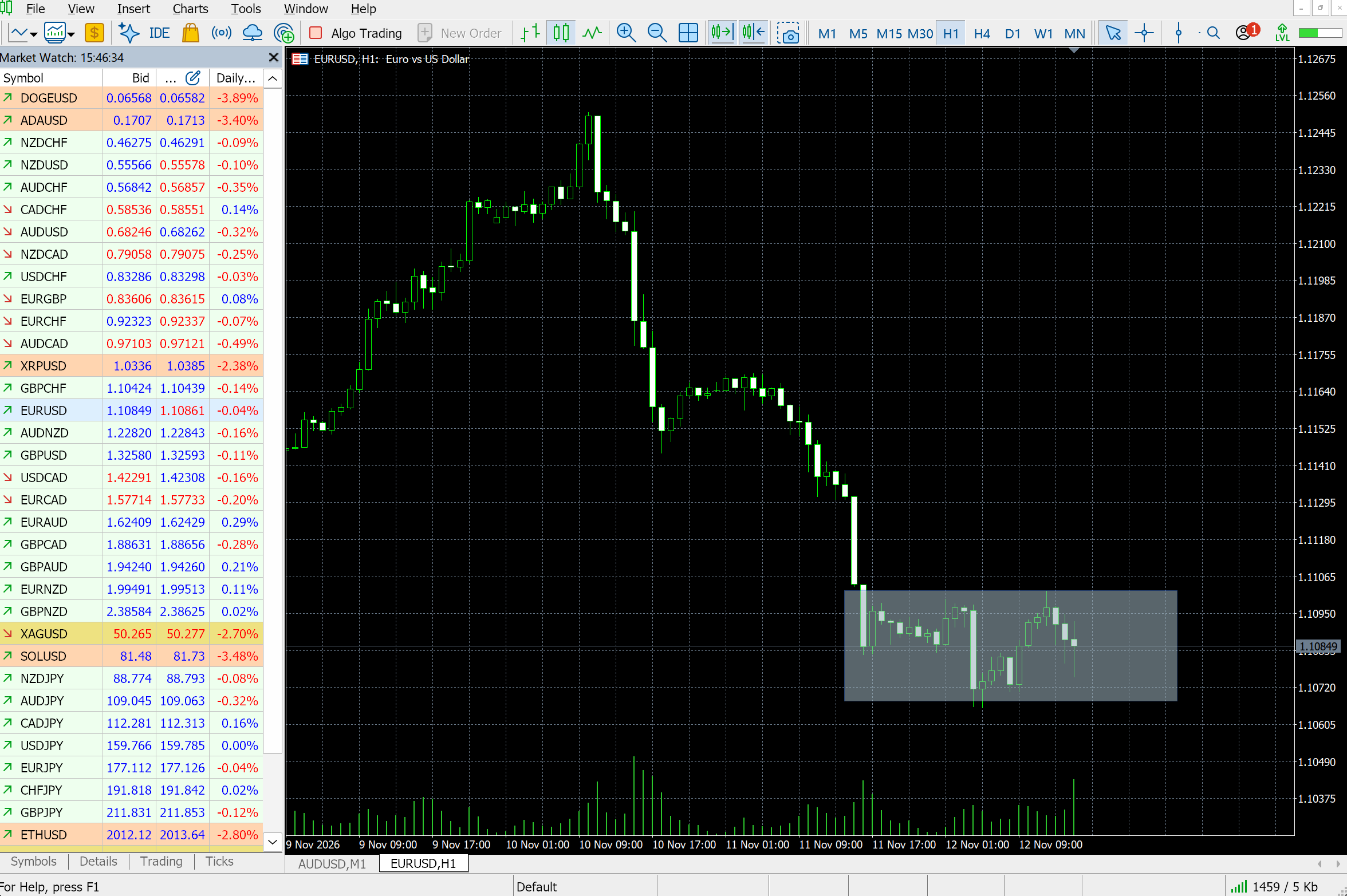
Breakout strategies look for the price leaving a narrow range after a period of low volatility. For example, the EA marks the range by the highest high and the lowest low of the last 20 candles. If the range is no wider than 40 pips, the EA treats it as narrow. When a new candle closes above the upper boundary, the EA opens a long position. A close below the lower boundary opens a short one.
| Strategy type | Entry rule in one line | Market conditions | How easy to automate |
|---|---|---|---|
| Trend following | The shorter moving average crosses the longer one from below | A market with a clear direction | Easy, built on standard indicators |
| Mean reversion | A candle closes outside the Bollinger Bands, a later candle closes back inside | A sideways market with no strong direction | Easy, uses clear numeric boundaries |
| Breakout | After a narrow 20-candle range, a candle closes above its top or below its bottom | The end of a quiet period and a possible strong move | Medium, needs an exact calculation of the range width and boundaries |
Arbitrage and high-frequency trading are automated too, though they depend on execution speed and direct market access that a private trader does not have, so this guide stays with the three types above.
Which Rules Does a Robot Need to Execute Your Strategy?
A robot needs five blocks of rules: entry, exit, stop loss, trading filters and position size. Vague conditions such as "a strong trend" or "a small stop" cannot be translated into code. Each rule needs exact parameters: price levels, indicator periods, position size and the moment the signal is checked, for example after a candle closes.
- Entry rule. The exact condition for opening a long or short position, with the timeframe and the moment the signal is checked.
- Exit rule. The condition for closing the position: a target level, an opposite indicator signal or a set time.
- Stop loss. The price level at which the position closes to limit the loss, set in pips from the entry price or as a fixed price.
- Trading filters. Conditions under which no new trades open: trading hours, a maximum spread between the buy and sell price, or the direction of the long-term trend.
- Position size. A fixed volume, or a volume calculated from the share of the account you accept to risk on one trade.
The wider process of designing a system around these blocks is in How to Create Your Own Trading System.
How to Turn Words Into Numbers for a Robot
| Block | In words | With exact conditions |
|---|---|---|
| Entry | Buy when a confident uptrend begins | Open a long position when EMA 50 crosses above EMA 200. Check the signal after the candle closes on the one-hour chart. |
| Exit | Close the trade when the profit is enough or the move weakens | Close the position at 60 pips of profit or after EMA 50 crosses back below EMA 200 on the one-hour chart. |
| Stop loss | Place it at a safe distance from the price | For a long position, set the stop loss 30 pips below the entry price. For a short position, 30 pips above it. |
| Filter | Do not trade at night | Open trades from 09:00 to 20:00 in the time zone of the trading platform. |
| Position size | Use a small volume to limit risk | Size the position so that a stop-loss hit loses no more than 1% of the current account balance. |
Test Your Rules on a Free Demo Account
Open a RoboForex demo account and run your first robot with virtual money.
How to Turn a Strategy Into Rules: A Worked Example
Take a simple trend strategy on EUR/USD with the one-hour chart. The example shows how a trading idea becomes a sequence of rules. It is educational only and carries no trading recommendation.
- Entry rule. After each H1 candle closes, the EA checks EMA 50 and EMA 200. If EMA 50 crosses above EMA 200, the EA opens a long position as the next candle starts. If EMA 50 crosses below EMA 200, it opens a short position. Only one position can be open at a time.
- Exit rule. The target is 60 pips above the entry price for a long position and 60 pips below it for a short one. The position also closes after the opposite crossover of EMA 50 and EMA 200, confirmed by a closed H1 candle.
- Stop loss. A stop loss is placed 30 pips from the entry price when the position opens: below the entry for a long position, above it for a short one.
- Time filter. New positions open from 09:00 to 20:00 platform time. An open position can stay active after 20:00 and closes at the target, at the stop loss or on the exit signal.
- Position size. Every trade is 0.01 lot. A fixed volume keeps the first test simple; the 1% risk rule from the table above can replace it later.
Here are the same conditions as step-by-step pseudocode for a programmer or ChatGPT. Exits are checked before entries, so an opposite crossover first closes the open trade and then opens the reverse one.
Pseudocode
Symbol = EURUSD
Timeframe = H1
Fast EMA = 50
Slow EMA = 200

On every candle close
    If Fast EMA crosses below Slow EMA on the latest closed candle
    and a long position is open
        Close the long position
    If Fast EMA crosses above Slow EMA on the latest closed candle
    and a short position is open
        Close the short position

    If platform time is from 09:00 inclusive to 20:00 exclusive
    and no open positions exist
        If Fast EMA crosses above Slow EMA on the latest closed candle
            Open a long position with a volume of 0.01 lot
            Set stop loss 30 pips below the entry price
            Set take profit 60 pips above the entry price
        If Fast EMA crosses below Slow EMA on the latest closed candle
            Open a short position with a volume of 0.01 lot
            Set stop loss 30 pips above the entry price
            Set take profit 60 pips below the entry price
How Do You Check That the Rules Are Complete?
The rules are complete when every situation has a rule, every condition has a number, signals use closed candles, conflicting signals have a set order and the end of the session is covered. Check your description against these five points before you hand it to a developer or ChatGPT.
- Every situation has a rule. The description says when the robot opens and closes a trade and what it does when there is no signal.
- Conditions are exact. Words such as "fast" or "strong move" are replaced with numbers and periods.
- Only available data is used. Conditions are checked on closed candles, or on the current price if the strategy calls for it. A rule that reads a candle still forming can give a signal that disappears before the candle closes, and a backtest of such a rule looks better than live trading.
- Rules do not contradict each other. The description says what happens when several conditions fire at once, for example an exit and a new entry on the same candle.
- The end of the session is covered. The description says whether an open trade stays active or closes.
Fill in the template with your own strategy. It builds a plain-text description you can copy into a brief or a ChatGPT prompt.
Strategy rules template
Empty fields use the EUR/USD example.
Your strategy rules
If any field stays vague after you fill it in, the robot will be vague in the same place, so rewrite it with a number before you move on.
One risk appears only after testing. If you keep adjusting the periods until the history looks perfect, the robot fits the past and often fails on new data. Keep the rules simple and check them on a stretch of history you did not use to choose the numbers.
What Comes After the Rules?
Once the rules are written and checked for contradictions, they become the brief for an Expert Advisor in MetaTrader 5. Expert Advisors are written in MQL5, the programming language of MetaTrader 5, and edited in MetaEditor. There are three ways to build one.
- Write the code yourself. With basic programming skills you can put the rules into MetaEditor, following Your First MQL5 Expert Advisor: A Ready-Made Robot You Can Copy and Launch Today.
- Generate the first draft with ChatGPT. Give the copied rules to ChatGPT as the task for an MQL5 Expert Advisor. The prompts for writing and fixing the code are in ChatGPT Trading Bot. The file it returns still needs checking and fixes.
- Configure a ready-made robot. For strategies on standard indicators you often do not need to write anything. Download a suitable robot from the MQL5 Market as shown in Expert Advisor Download for MT5 and change its settings to match your rules.
Whichever path you take, the robot then goes through four stages before it trades a standard account.
- Strategy TesterHistory shows whether trades open where the rules say
- Demo accountLive quotes check execution with virtual money
- ProCent accountReal spreads and execution, with the balance shown in cents
- Standard accountOnly after the robot works steadily at every earlier stage
Start with the step-by-step test in A 15-Minute Backtest: How to Test a Trading Robot in MetaTrader 5, then run the robot on a demo account. For a first test with real money, the ProCent account shows the balance in cents. Results on history and on a demo account do not guarantee the same performance in the future. Two common ways to build and test a full system are compared in Building Algorithmic Trading Systems.
Run Expert Advisors in RoboForex MetaTrader 5
Desktop MT5 with MetaEditor, algo trading and the Strategy Tester built in.
Conclusion
A trading idea is ready for automation once its entry and exit conditions, stop loss and take profit, trading filters and position size are all written with numbers. That description becomes a clear task for a developer or ChatGPT. Start with the EUR/USD crossover example, put your own numbers into the template and run the finished robot in the Strategy Tester before a demo account.
FAQ
Can any trading strategy be automated?
A strategy can be automated when its rules can be written as unambiguous conditions. Approaches based on a subjective reading of the market, intuition or visual search for chart patterns are much harder to put into code.
Do I need to know programming to automate a strategy?
You do not need deep programming knowledge to describe a strategy. With detailed rules, ChatGPT can generate the base of the code. Basic familiarity with MetaEditor helps when you compile and adjust the Expert Advisor.
Which automated trading strategy suits beginners?
A simple moving average crossover is a good start. It uses standard terminal indicators, has few settings and makes the logic of every trade easy to follow when you test it on history.
Is automated trading allowed in MetaTrader 5?
Yes, MetaTrader 5 supports automated trading with Expert Advisors, which are written in MQL5 in MetaEditor. Before launch, check how the robot works in the Strategy Tester and that algo trading is enabled in the platform.
How much money do I need to start automated trading?
Learning the platform and checking a robot's logic costs nothing, since the tests run on history and on a demo account. For a first step with real money, cent accounts such as ProCent start from 10 USD, and even that trading carries risk.
- How to Launch an AI Trading Robot: A Step-by-Step Guide for Beginners: the full route from a trading idea to a robot on a chart.
- ChatGPT Trading Bot: Prompts That Write, Fix and Explain MQL5 Code: turn the rules from the template into MQL5 code.
- Your First MQL5 Expert Advisor: A Ready-Made Robot You Can Copy and Launch Today: a complete crossover robot to compare with your rules.
- A 15-Minute Backtest: How to Test a Trading Robot in MetaTrader 5: the first test for any robot built from your rules.
Any information provided in articles on this website is based solely on the personal opinions of the authors. These articles should not be construed as trading recommendations or a call to action. The authors and RoboForex accept no responsibility for the results of any trades made on the basis of these recommendations and reviews. Past performance is not indicative of future results. Trading stocks and CFDs involves a high risk of capital loss.