ChatGPT Trading Bot: Prompts That Write, Fix and Explain MQL5 Code

A ChatGPT trading bot starts with your rules: describe entries, exits and risk precisely, and ChatGPT turns them into MQL5 code for a MetaTrader 5 Expert Advisor. This guide gives copy-ready prompts that write a robot, fix compile errors in MetaEditor and explain code someone else wrote. Every robot then goes through the Strategy Tester and a demo account.
TL;DR
- ChatGPT writes MQL5 code when the prompt spells out the entry, exit and risk rules.
- The prompts below copy as they are: for building a robot, fixing compile errors and reading someone else's code.
- Every robot goes through the Strategy Tester and a demo account before it trades real money.
The full route from a trading idea to a robot running on a chart is in How to Launch an AI Trading Robot. This page is the prompt library for each task along that route.
Can ChatGPT Build a Trading Bot?
Yes, ChatGPT can write the code of a basic trading robot. The trading idea has to come from you. ChatGPT, the AI chatbot from OpenAI, translates the rules of your system into MQL5, the programming language MetaQuotes built for MetaTrader 5. Robots written in MQL5 are called Expert Advisors, or EAs.
AI speeds up the coding. The financial result still comes from the logic you put into the prompt. To get a working tool, split the job in advance: what you hand to ChatGPT and what you check yourself.
| What ChatGPT does well | What you check yourself |
|---|---|
| Writes the code of a MetaTrader 5 Expert Advisor from your rules | Whether the EA buys and sells at the moments your rules describe |
| Connects built-in indicators that generate the trading signals | That the EA never opens trades larger than you planned |
| Explains in plain words what each block of code does | The loss limit at which the robot stops trading |
| Adds a trailing stop that moves the Stop Loss behind the price | How the EA performs on history in the Strategy Tester |
Keep this split in mind: ChatGPT takes the typing, and your time goes into the rules, the risk limits and the tests.
What Do You Need Before You Write the First Prompt?
To build a ChatGPT trading bot you need four things: MetaTrader 5 with MetaEditor, access to ChatGPT, your strategy written out in words and a demo account.
- MetaTrader 5. The terminal installed on your computer, with MetaEditor, the code editor where you paste, compile and run ChatGPT's code. Setup is covered in MT5 Download and Setup.
- ChatGPT. ChatGPT or another AI chatbot that handles code well. Model names change often, so use the strongest model available to you.
- Your rules in words. Clear conditions for entry, exit and risk. You write them, ChatGPT turns them into code.
- A demo account. A RoboForex demo account connected to the terminal, so the robot is tested with virtual money.
Test Your Robot on a Free Demo Account
Open a RoboForex demo account and run the code ChatGPT writes with virtual money.
How Do You Write a Prompt ChatGPT Turns Into Working MQL5 Code?
Give ChatGPT five things: a role, the entry and exit rules, the risk rules, the inputs and a request for comments. A vague request returns a raw robot with logic errors. A prompt with all five returns code that is easier to set up and check.
- Role. Ask ChatGPT to act as an expert MQL5 developer for MetaTrader 5.
- Entry and exit. The exact signals that open and close a trade, with no room for two readings.
- Risk. How the lot is sized and where the Stop Loss and Take Profit sit.
- Inputs. Indicator periods, lot and stop distances as input parameters, so you change them in the robot's settings without editing code.
- Comments. A short plain-language note on each key block, so you can check the logic quickly.
Here is how to use ChatGPT for trading code in practice: the same moving average robot, asked for in two ways.
| Weak prompt | Strong prompt | |
|---|---|---|
| Prompt | Write a trading robot for MT5 on a moving average that buys when the price is above the line and sells when it is below. | Act as an expert MQL5 developer and write an Expert Advisor for MT5. Buy when a closed bar crosses above a 20-period Simple Moving Average, and sell when a closed bar crosses below it. Close the open position on the opposite signal. Allow only one open position at a time. Add input parameters for a lot of 0.01 and for Stop Loss and Take Profit in pips. Explain in plain words what each block of code does. |
| What you get | A raw EA template with arbitrary moving average settings. Trades open without stop orders and can pile up. | A readable MQL5 base with your settings, protective orders and predictable signal handling. |
Build your own version of the strong prompt below. Pick a task, fill in your rules and copy the result into ChatGPT.
Prompt builder
Your prompt
Whatever the task, the rule stays the same: the more exact the rules in the prompt, the fewer rounds of fixes the code needs.
Prompts That Write a Trading Robot
Build a robot module by module. Each prompt below covers one block of a typical MetaTrader 5 Expert Advisor. Copy it, change the numbers to match your rules and paste it into ChatGPT. Ready-made code for a complete first robot is in Your First MQL5 Expert Advisor.
Moving Average Crossover Robot
Prompt
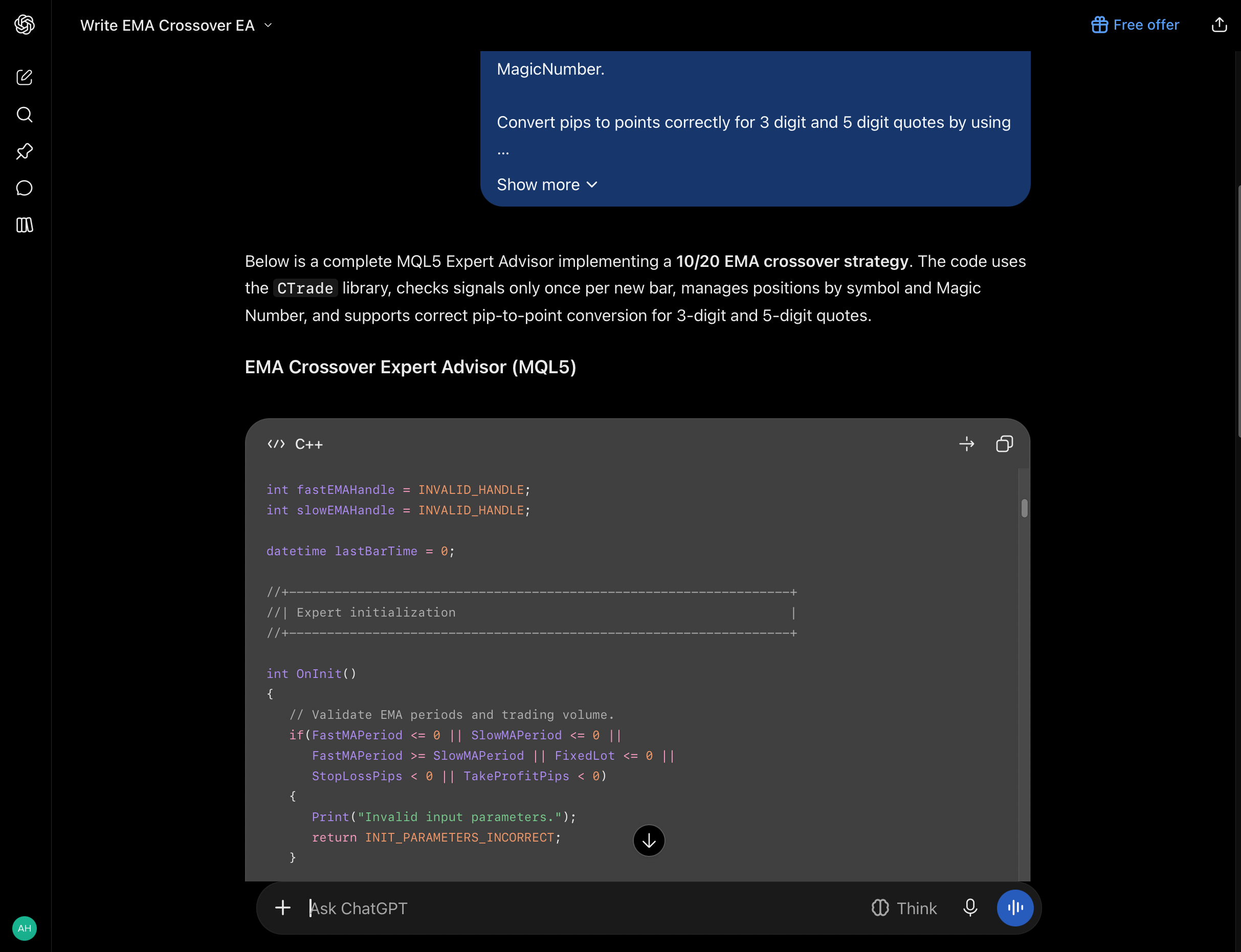
Act as an expert MQL5 developer for MetaTrader 5. Write a clean, modular Expert Advisor (EA) based on the crossover of two Exponential Moving Averages with Fast EMA period 10 and Slow EMA period 20.

Include input parameters for FastMAPeriod, SlowMAPeriod, FixedLot (default 0.01), StopLossPips, TakeProfitPips, and MagicNumber.

Open a Buy position when the Fast EMA crosses above the Slow EMA, and close any existing Sell position. Open a Sell position when the Fast EMA crosses below the Slow EMA, and close any existing Buy position. Allow only one open position at a time.

Check for a new bar and evaluate crossover signals using EMA values from the two most recently closed bars. Process each signal only once. Manage only positions matching the current symbol and MagicNumber.

Convert pips to points correctly for 3 digit and 5 digit quotes by using 10 points per pip for 3 digit and 5 digit symbols, and 1 point per pip otherwise.

Use the CTrade library for order execution. Validate indicator handles and trade operation results. Add clear comments explaining each block of code.
In the result, check three things: the EA reads indicator values from closed bars, converts pips correctly for 5-digit quotes and acts once per new bar.
Trailing Stop
Prompt
Act as an expert MQL5 developer. Write a modular trailing stop function that can be integrated into an MT5 Expert Advisor.

Include input parameters for EnableTrailing as bool, TrailingStopPips as int with default 30, TrailingStepPips as int with default 5, and MagicNumber as long.

If EnableTrailing is false, do nothing. Loop through all open positions and manage only positions matching the current chart symbol and MagicNumber. Handle BUY and SELL positions separately. For a BUY position, calculate the trailing Stop Loss below the current Bid price. For a SELL position, calculate the trailing Stop Loss above the current Ask price.

Start trailing only when the floating profit of the position reaches at least TrailingStopPips. Move the Stop Loss only when the proposed level improves the existing Stop Loss by at least TrailingStepPips. If no Stop Loss exists, set one when the trailing conditions are met. Never move a Stop Loss farther from the current price in a way that increases the risk of the position.

Convert pips to price distance correctly for the digits and point size of the symbol. Before modifying a position, read SYMBOL_TRADE_STOPS_LEVEL and SYMBOL_TRADE_FREEZE_LEVEL for that symbol, convert their values from points to price distance, and respect the applicable broker restrictions. Do not hardcode fixed broker distances, as symbol settings may vary.

Normalize the proposed Stop Loss to the digits of the symbol. Use the position ticket when modifying positions so the correct position is changed on hedging accounts. Check both the PositionModify() return value and the trade server result code. Log a clear message if a modification fails or is blocked by broker restrictions. Preserve the existing Take Profit of the position when modifying its Stop Loss. Add clear comments explaining each block of code and any symbol level assumptions.
Check that buy and sell positions get separate Stop Loss calculations and that the Take Profit stays where it was when the Stop Loss moves.
Trading Hours Filter
Prompt
Act as an expert MQL5 developer. Create a modular time filter for an MT5 Expert Advisor.

Include input parameters for StartHour as int with default 9, StartMinute as int with default 0, EndHour as int with default 21, and EndMinute as int with default 0.

Create a boolean function IsTradingAllowed() that uses TimeCurrent() and the time of the broker server.

Validate that hours are between 0 and 23 and minutes are between 0 and 59. Compare the current time of day with the configured trading window using a half open interval where trading is allowed at the exact start time and disallowed at the exact end time.

Support trading windows that cross midnight. For example, a window from 22 hours 00 minutes to 02 hours 00 minutes allows trading from 22 hours until midnight and from midnight until 02 hours.

If the start time equals the end time, treat the window as disabled and return false. Add clear comments explaining the server time basis and midnight handling.
Check that a window crossing midnight works and that the filter reads the broker's server time, which can differ from the clock on your computer.
Position Size From a Risk Percent
Prompt
Act as an expert MQL5 developer. Write a reliable function for dynamic position size calculation based on account risk.

Include input parameters for RiskPercent as double with default 1.0, and StopLossPips as int with default 100.

Retrieve account equity using AccountInfoDouble(ACCOUNT_EQUITY). Read the tick size, tick value, minimum volume, maximum volume, and volume step of the symbol using SymbolInfoDouble(). Convert StopLossPips to a price distance correctly for the current symbol.

Calculate the monetary loss for one lot at the specified Stop Loss distance, then calculate the lot size so the estimated loss does not exceed RiskPercent of current equity. Round volume down to the nearest valid SYMBOL_VOLUME_STEP. Do not round up, since that could exceed the requested risk.

Enforce SYMBOL_VOLUME_MIN and SYMBOL_VOLUME_MAX. If the calculated volume is below SYMBOL_VOLUME_MIN, return 0 and explain that the trade should be skipped instead of raising it to the minimum lot. Cap volume at SYMBOL_VOLUME_MAX.

Validate all inputs and symbol values. Return 0 if RiskPercent, StopLossPips, tick size, tick value, or volume step is invalid, or if the loss cannot be calculated reliably. Clearly document that commissions, slippage, gaps, and currency conversion can make the actual loss differ from the estimate. Add clear comments and provide a short explanation of the calculation.
Check that the volume always rounds down to the allowed step and that the robot skips the trade when the lot comes out below the minimum.
Run Expert Advisors in RoboForex MetaTrader 5
Desktop MT5 with MetaEditor, algo trading and the Strategy Tester built in.
Prompts That Fix Compile Errors
To fix an MQL5 compile error with ChatGPT, copy the exact message and line number from the MetaEditor Errors tab, send it back with the code and ask for the smallest correction. Repeat the loop until the code compiles.
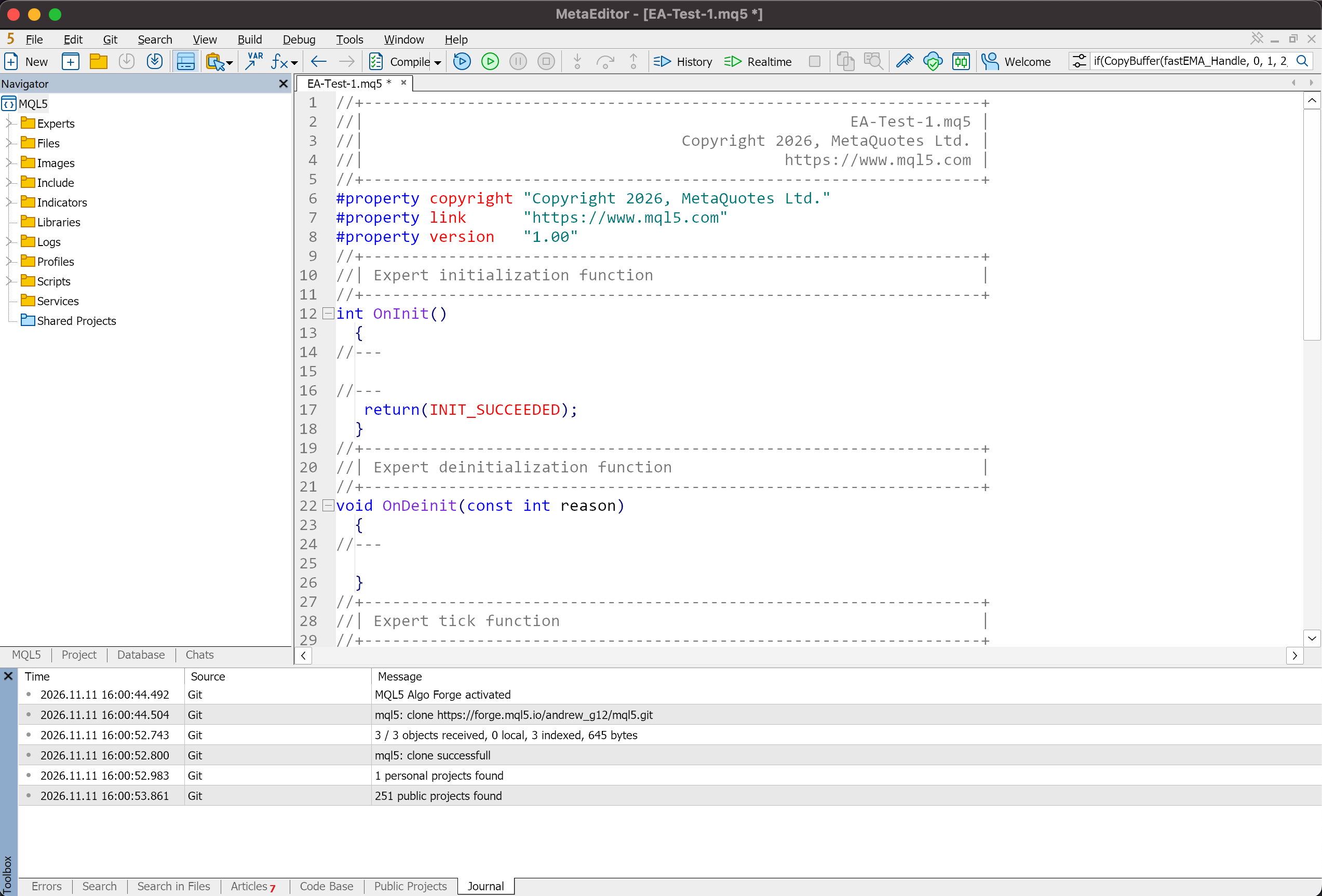
- PastePut ChatGPT's code into a new Expert Advisor file in MetaEditor.
- CompileClick Compile on the toolbar or press F7.
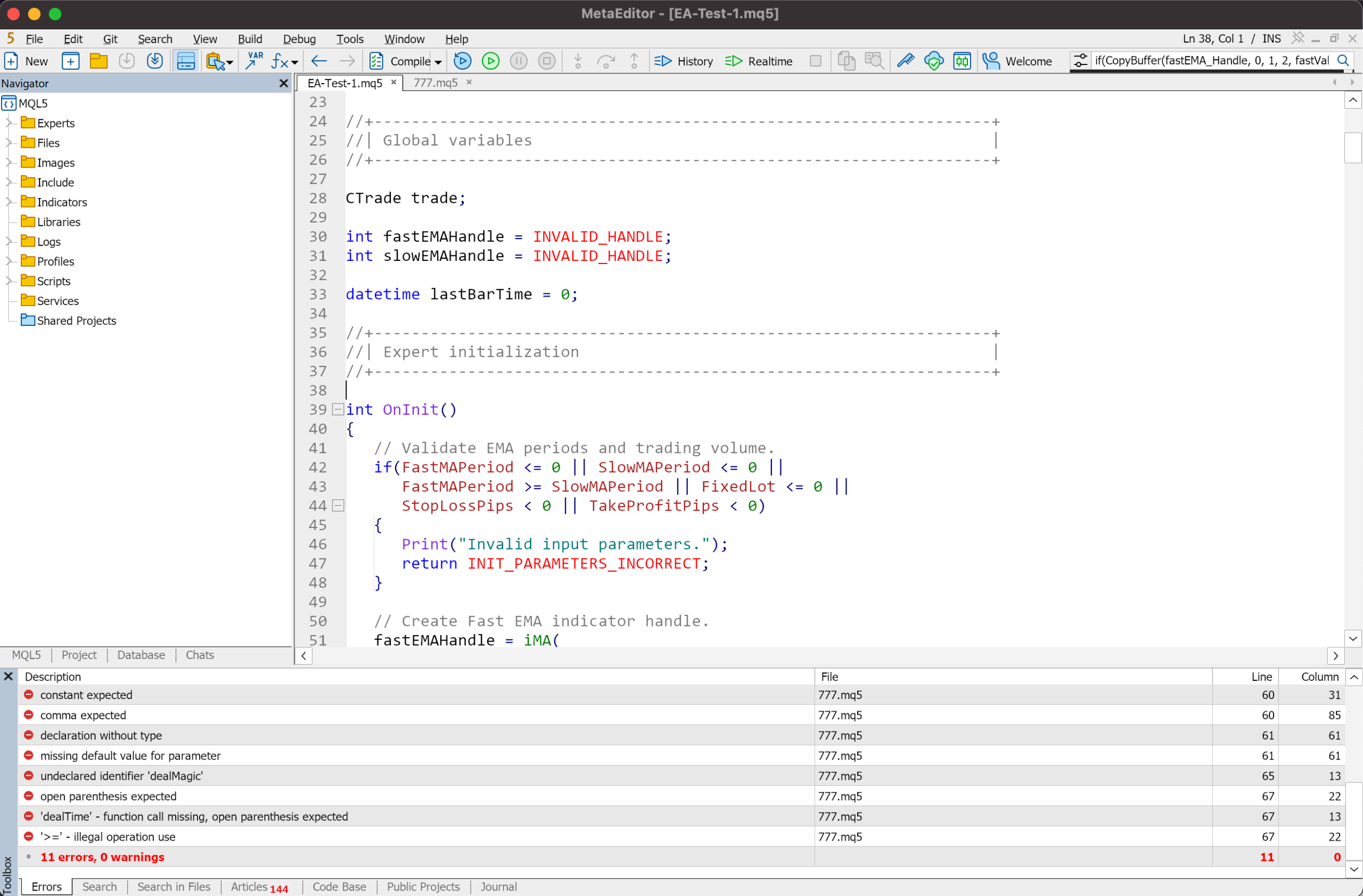
- Copy the errorsOpen the Errors tab of the Toolbox and copy each message with its line number.
- Send and repeatSend the errors with the code to ChatGPT, paste the fix, compile again.
Example 1: CTrade Undeclared Identifier
ChatGPT used trade commands such as trade.Buy() but did not include the standard trading library or declare the CTrade object.
Prompt
The MQL5 compiler reports CTrade undeclared identifier on line [line number] after compilation. Check the relevant code and make the smallest necessary correction. If needed, add the correct standard library include directive #include <Trade/Trade.mqh> and declare the trade object as CTrade trade;. Explain the changes you made.

My code:
[paste your .mq5 code here]
Example 2: Unmatched Braces or a Misspelt OnTick
The curly braces do not balance, or the name of an event handler has a typo. In MQL5 the tick handler is OnTick() with a capital O and T. The real cause can sit above the line the compiler points to.
Prompt
The MetaEditor compiler reports a syntax or function structure error. Review the entire MQL5 file for unmatched braces, missing function bodies, and misspelled event handler names such as OnTick(). Identify the cause of each reported error, make the smallest necessary corrections, and explain which lines you changed.

My code:
[paste your .mq5 code here]
Send the exact messages from the Errors tab together with the code, and most typical errors clear in a few rounds. A clean compile only means the code is valid MQL5. The trading logic still has to pass the tests below.
Prompts That Explain Code You Did Not Write
Give ChatGPT the robot's .mq5 file and ask it to explain the logic. This helps with open-source robots, such as those from the MQL5 Code Base described in Expert Advisor Download for MT5, even if you do not program.
Explain the Robot Line by Line
Prompt
Act as an expert MQL5 developer. Explain this code line by line and include line numbers for each section. Break down the purpose of each function, variable declaration, and technical indicator handle used in the script.

My code:
[paste your .mq5 code here]
Find the Lot, the Stops and the Entry
Prompt
Analyze this MQL5 script and identify exactly where the position volume or lot size, protective stop loss and take profit levels, and market entry signals are defined. Point out the specific line numbers or input variables controlling these parameters, and explicitly note any setting that is calculated inside the code instead of set as a fixed input.

My code:
[paste your .mq5 code here]
The answer shows which settings you change on the Inputs tab and which sit inside the code. What each common input does is covered in Trading Robot Settings Explained. Check the explanation against the code itself, since ChatGPT can miss details in a long file.
How Do You Test a ChatGPT Trading Bot Before It Trades?
Test a ChatGPT trading bot in four stages: the Strategy Tester, a demo account, a ProCent cent account and only then a standard live account. A clean compile says nothing about how the robot trades, so each stage checks something the previous one cannot.
- Strategy TesterHistory shows whether trades open where the rules say, and how deep the drawdown goes
- Demo accountLive quotes check order execution with virtual money
- ProCent accountReal spreads and execution, with the balance counted in cents
- Standard accountOnly after the robot works steadily at every earlier stage
Start with the step-by-step run in A 15-Minute Backtest. Then move the robot to the demo account and watch how its orders fill on live prices. The ProCent account follows: the robot trades real money under real spreads, with the smallest volumes and a balance shown in cents. Past results do not guarantee future returns.
Conclusion
ChatGPT writes MQL5 code for a trading robot when the prompt carries exact entry, exit and risk rules. Start with the crossover prompt, compile the result in MetaEditor, clear the errors with the two repair prompts and run the robot in the Strategy Tester. Then leave it on a demo account with virtual money before any real trade.
FAQ
Can ChatGPT trade for me?
ChatGPT writes and explains the code and has no connection to your trading account. The Expert Advisor runs inside MetaTrader 5, and the terminal sends the orders to the broker. You decide when the robot is switched on and with what risk limits.
Is ChatGPT good for trading?
ChatGPT is a convenient assistant for writing trading code and explaining how an algorithm works. It does not invent profitable strategies or predict prices, so the result depends on the rules the trader gives it.
Can ChatGPT write MQL5 code?
Yes, ChatGPT can write the basic code of a MetaTrader 5 Expert Advisor. A detailed prompt gets the best base: the role, the entry and exit rules, the lot sizing and the stop levels. Compile the result in MetaEditor and test it before use.
Are AI trading bots legal?
Running an Expert Advisor on your own account is a standard MetaTrader 5 feature, and RoboForex accounts allow algorithmic trading. A robot written with ChatGPT is an Expert Advisor like any other. Rules on automated trading can differ from country to country, so check the ones that apply where you live.
Do AI trading bots really work?
A trading bot works in the sense that it applies its rules to every signal while the terminal runs. Whether it earns money depends on the strategy and the risk limits, and writing the code with AI changes neither. Results on history do not guarantee future returns.
Which ChatGPT version works best for MQL5?
Use the most advanced model available in ChatGPT that handles programming well. Model names and availability change often, and even a strong model makes mistakes, so every piece of code still goes through compilation and testing.
- How to Launch an AI Trading Robot: A Step-by-Step Guide for Beginners: the full route from a trading idea to a robot on a chart.
- Your First MQL5 Expert Advisor: A Ready-Made Robot You Can Copy and Launch Today: complete code to compare with what ChatGPT gives you.
- How to Install an EA in MT5 and Place Your First Automated Trade: put the compiled robot on a chart.
- A 15-Minute Backtest: How to Test a Trading Robot in MetaTrader 5: the first test for any robot ChatGPT writes.
Any information provided in articles on this website is based solely on the personal opinions of the authors. These articles should not be construed as trading recommendations or a call to action. The authors and RoboForex accept no responsibility for the results of any trades made on the basis of these recommendations and reviews. Past performance is not indicative of future results. Trading stocks and CFDs involves a high risk of capital loss.