Forward Testing a Trading Robot: A 30-Day Plan

Forward testing runs a trading robot, an Expert Advisor in MetaTrader 5, on live prices after its backtest, so you see how it trades on prices it has never seen. This 30-day plan starts the robot on a demo account, compares its report with the backtest after three weeks and moves it to a small cent account in week 4.
TL;DR
- Run the robot on a MetaTrader 5 demo account for three weeks with inputs saved before Day 1, and log each day in about five minutes.
- At the end of week 3, compare the profit factor, expected payoff, maximum drawdown and number of trades with the backtest.
- Move to a cent account only if the robot made no technical errors and the four numbers stay within the limits. A close match still gives no guarantee of future profit.
Start the Plan on a Free Demo Account
Open a RoboForex demo account and run your robot in MetaTrader 5 on live quotes with virtual money.
The plan has four stages. Each one ends with a check, and the robot moves on only when it passes.
- Week 1Demo account: launch and daily checksPass: no technical errors
- Weeks 2 and 3Demo account: collect trades, compare the report with the backtestPass: four numbers within the limits
- Week 4Cent account: real execution at 0.01 lotCheck: 20 fills, slippage up to 1 pip
- After Day 30Extend, continue at small volume or stopDecide on the trade count
What Is Forward Testing and How Does It Differ From Backtesting?
Forward testing checks a trading robot on quotes as they arrive, while a backtest replays the same rules on archived prices. The backtest shows how the strategy would have done in the past. The forward test shows whether that result holds on new prices and real order fills.
| What differs | Backtest | Forward test |
|---|---|---|
| Prices | Archived quotes in the Strategy Tester | Quotes that reach the chart now, on a demo or a live account |
| Time | Minutes for a year of history | As long as the robot needs to collect trades, 30 days in this plan |
| Money at risk | None | None on demo, a small real amount on a cent account |
| Order fills | Modelled by the tester, ideal by default | Real spread, slippage and server delays |
| What it proves | The rules worked on past prices | The result holds on prices the robot has never seen |
The two tests run in sequence. In forward testing vs backtesting, each test has its own job: the backtest filters out weak rules in minutes, and the forward test checks the survivors on the live market. With both reports in hand, you decide on evidence whether the robot is ready for real money.
Why Does a Trading Robot Need a Forward Test?
A backtest cannot fully reproduce the live market. A floating spread, slippage and delays on the trade server all change the price at which an order fills. A robot can show a profit on history that it does not repeat on live quotes.
The Forward field in the MetaTrader 5 Strategy Tester splits the history in two: the tester picks the robot's inputs on the first part and checks them on the later part. This guards against inputs fitted too closely to past prices, and it is covered in A 15-Minute Backtest and Walk Forward Optimisation in MetaTrader 5. The check still runs on history, so it remains a simulation. This plan takes the robot onto the live market.
What Do You Need Before Day 1?
Prepare five things before the robot places its first live trade. Without them, the numbers on Day 30 have no baseline to compare with.
- The backtest report. Save the Strategy Tester report with the profit, the drawdown and the balance graph. At the end of the plan the forward numbers are set against it.
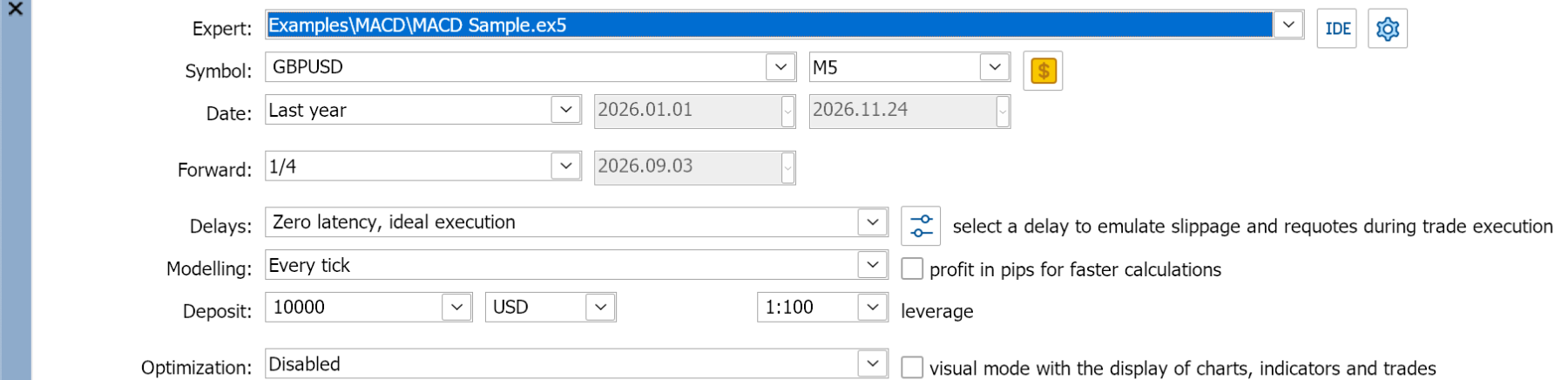
- A saved set of inputs. Save the robot's inputs to a file on the Inputs tab of its properties before launch, and keep the same symbol and timeframe as in the backtest. The inputs stay unchanged for all 30 days, apart from the lot size in week 4, so the final numbers can be matched with the backtest. Open the demo account with the same deposit and leverage as the backtest, so the drawdown and the expected payoff compare like for like. A RoboForex demo account starts with 10,000 virtual USD, the deposit in the screenshot above, and more can be added.
- A unique magic number. This number in the inputs tags the robot's trades, so they stay apart from manual trades and from other robots. Trading Robot Settings Explained covers it with lot size and stops.
- A computer or VPS that stays on. MetaTrader 5 has to run around the clock, and the computer must not go to sleep, or the robot misses entries and cannot manage open positions. If that is hard to guarantee at home, run the terminal on a RoboForex VPS.
- A journal. One spreadsheet with a row per day and the columns below.
| Journal column | What to write |
|---|---|
| Date | The trading day |
| Balance and equity | Both values when the trading day closes |
| Maximum floating drawdown | The largest loss on open positions during the session |
| Closed trades | How many closed and their total result |
| Experts and Journal | Errors, lost connection, requotes, delays in sending orders |
| Fills (week 4) | The price each order filled at, how far it was from the price the robot asked for, and the time, news and trading session |
Week 1: Run the Robot on a Demo Account
In week 1 the robot trades a demo account, so its work can be checked in real time without risk to real money.
- Attach the robot to a chart with the same symbol and timeframe as in the backtest.
- Load the saved inputs on the Inputs tab.
- Check that the terminal is connected to the broker's server and quotes are coming in.
- Turn on Algo Trading on the toolbar.
Watch the first trades: each should open at the volume set in the inputs, with Stop Loss and Take Profit where the inputs place them. Then give the robot about five minutes at the end of each trading day.
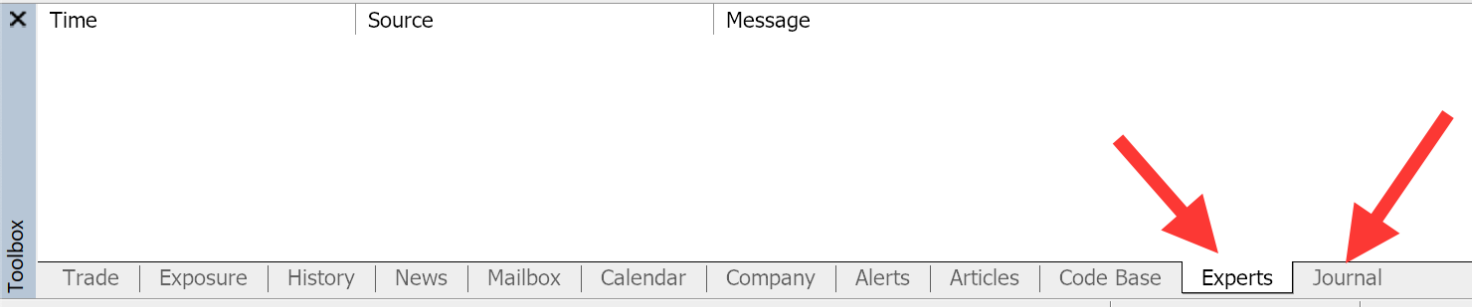
- Open the Experts tab. The robot writes its messages here, and they show errors in its logic, in the volume calculation or in placing orders.
- Open the Journal tab. It lists the terminal's events, including a lost connection to the server, repeated requests and delays in sending orders.
- Fill in the day's row in the journal: balance, equity, closed positions, the largest floating drawdown and notes from both tabs.
- Check the day's trades on the chart against the strategy's entry rules.
If the week passes without technical faults and the robot trades by its rules, the test continues with the same inputs.
Weeks 2 and 3: Compare the Forward Report With the Backtest
In weeks 2 and 3 the robot keeps trading the demo account and the journal keeps growing. At the end of week 3, build the account report in MetaTrader 5: right-click the History tab and choose Report. Set its numbers against the backtest for a period of similar length.
The main number is the profit factor: gross profit on closed trades divided by gross loss, as the MetaTrader 5 Help defines it. A profit factor of 1.5 means the winning trades earned one and a half times what the losing trades lost. Next to it go the expected payoff, which is the average result per trade, the maximum drawdown, which is the largest fall from a balance or equity peak to the next low, and the number of trades. Both reports show all four in the same terms.
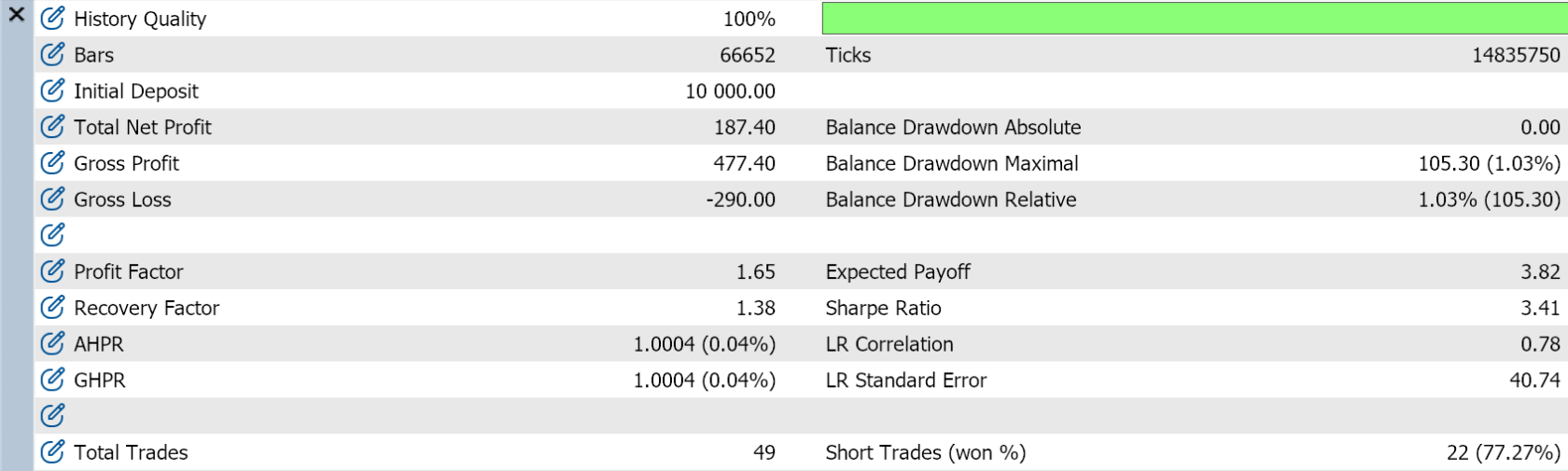
A backtest with a profit factor below 1 or a negative expected payoff has nothing to confirm on the live market. Forward test only a robot whose backtest is in profit. For the comparison itself, this plan uses four limits: the forward profit factor no more than 15% below the backtest, the expected payoff positive and no more than 20% below it, the maximum drawdown no higher than the backtest's maximum drawdown over its full period, and the number of trades within 20% of it. They are our rule of thumb, set so that normal differences in spread and fills pass and a broken robot does not. The checker below applies them to your numbers.
Check Your Forward Report Against the Backtest
Example values are filled in. Replace them with the numbers from your two reports.
Profit factorReport row Profit Factor. Limit: no more than 15% below the backtest
11.1% lower, within the limit
Expected payoff, USDReport row Expected Payoff. Limit: stays positive and no more than 20% below the backtest
15.6% lower, within the limit
Maximum drawdown, %Report row Balance or Equity Drawdown Maximal, the same in both reports, the backtest value for its full period. Limit: no higher than the backtest
10.0% lower, within the limit
Number of tradesReport row Total Trades, for a backtest period of the same length. Limit: within 20% of the backtest
12.5% fewer, within the limit
All four numbers are within the limits of this plan. If week 1 showed no technical errors, move to a cent account in week 4 with the same inputs. A close match still gives no guarantee of future profit.
With the example values, the forward profit factor of 1.60 sits 11.1% below the backtest's 1.80, and every other number also stays inside its limit. Results from the first three weeks of trades are a first reading, and they say nothing certain about future profit. If a number falls outside its limit, run three quick checks in MetaTrader 5.
- Compare the settings and the chart. The symbol, the timeframe and the inputs must match the file saved before Day 1.
- Check the trades and the terminal's messages. Look for errors or connection problems on the Journal tab. In the account history, compare the open and close prices of the trades with the prices on the chart and note any large gaps.
- Check the backtest itself. In the tester settings, see whether the Modelling field was set to Every tick based on real ticks. In the report, look at History Quality and make sure the price history has no visible gaps.
Week 4: Move to a Cent Account
If three weeks on demo brought no technical errors and the four numbers stayed within the limits, week 4 can move to a real cent account. Here you see how the robot's orders fill on a real account. Real prices can differ from demo because of slippage and a wider spread, around news releases in particular. A cent account is a real account with the balance shown in cents: a 10 USD deposit appears as 1,000 US Cents. At RoboForex this account type is called ProCent. It lets you check the robot under these conditions with a small deposit, and the money at risk is real.
Cent accounts are explained in What Is a Cent Account in Forex and Who Needs It?, and how results change between demo and real money in Paper Trading vs Live Trading.
| Condition | ProCent account |
|---|---|
| Minimum deposit | 10 USD or 10 EUR; 10 USD shows as 1,000 US Cents |
| Minimum spread | From 1.3 pips, Market Execution |
| Minimum order volume | 0.01 lot in MetaTrader 5 |
| Volume step | 0.01 lot |
| Limits in MetaTrader 5 | Up to 1,000 open positions and 500 active orders |
| Stop Out | 30% |
| Account history | Stored for 1 month |
Conditions as listed on the RoboForex cent account page on 26 November 2026. Check the page before you open an account.
In week 4 the robot runs on the cent account with the same inputs, except the lot size, which drops to 0.01 lot. Record the fill price of each order in the journal, how far it was from the requested price, and the time, any news release and the trading session. Forex For Starters, in its guide How to Reduce Slippage, suggests exactly this small slippage audit: track 20 fills and patterns show quickly. For a first check of execution in calm hours, our rule of thumb is an average slippage of up to 1 pip per trade. If the robot trades rarely, keep the cent stage running until it has 20 fills. Since the account history is kept for one month, save the report at the end of the week.
How Many Trades Is Enough?
Thirty days is a schedule for a first check, and it does not guarantee enough data. If the robot opened only a few trades in that time, its match with the backtest is hard to judge. So the plan runs for 30 days or until the robot reaches 50 trades, whichever comes later. Set a higher count before Day 1 if your strategy needs a larger sample.
Published guides give different figures. The Forex For Starters backtesting guide asks for at least 100 trades for reliable results and calls fewer than 50 not meaningful. Its forward testing page suggests a demo test of at least two to three months or at least 50 trades, whichever comes first. Use these figures to plan the test; they do not make a strategy reliable.
A robot with 3 trades a week needs about 17 weeks to reach 50 trades
Weeks to reach 50 trades, by trades per week. Dashed line: Day 30
| Trades per week | Weeks to reach 50 trades |
|---|---|
| 25 trades a week | 2 weeks |
| 10 trades a week | 5 weeks |
| 3 trades a week | 16.7 weeks |
- At 10 trades a week the robot reaches 50 trades five days after Day 30.
Source: RoboForex Blog calculation; 50 trades from the Forex For Starters forward testing page. Data as of 26 November 2026.roboforex.com/blog
If the robot made about 10 trades in 30 days, extend the demo stage and keep collecting data. Judge the trades by their results, the drawdown and how closely they follow the strategy's rules, as well as by their number. A larger sample gives more to compare with the backtest.
Run Your Robot in RoboForex MetaTrader 5
The Strategy Tester, the Experts and Journal tabs and the account reports from this plan are built into the desktop terminal.
What If the Forward Result Is Worse Than the Backtest?
Some gap between the forward test and the backtest is normal, and its cause is still worth a check. The comparison ends in one of three outcomes.
Continue
Close to the backtest
Profit factor, expected payoff, drawdown and the number of trades are all within the limits. Move to the next stage.
Check, then continue
Slightly worse
For example, the profit factor fell from 1.8 to 1.6 and the drawdown stayed within its limit. Check the spread and the slippage. If there is no technical problem, leave the inputs as they are and keep testing.
Pause
Much worse
The account shows a loss where the backtest made a profit, or the drawdown is far above the limit. Stop the test and check the inputs, the trade history, the quality of the price history and how the orders filled. Find the cause before you restart.
What to Do After the 30 Days
After 30 days, review the whole journal and decide whether to go on. If the robot met the limits and showed no technical problems, three next steps are open.
- Move the terminal to a VPS. If your home computer is not on all the time or the connection drops, a RoboForex VPS keeps MetaTrader 5 and the robot running. A VPS has no effect on how profitable the strategy is.
- Stay on the cent account at a small volume for longer. Set the position size by the risk you accept, and leave the robot's recent profit out of that choice. A larger lot or a standard account is a separate decision, made on results over a longer period.
- Start the next robot. While one robot trades a small volume, a new one can go through the same plan on a demo account. To pick its inputs first, see Walk Forward Optimisation in MetaTrader 5: How to Find Robot Settings That Hold Up.
Conclusion
A 30-day forward test takes a trading robot through the live market in order: the demo account checks its technical work, the report comparison checks its numbers against the backtest, and a cent account shows real fills at a small size with real financial risk. A standard account is never the automatic end of the test; it needs more data and a risk level you have chosen. Start today: save the backtest report and the inputs file, write the four limits into your journal and launch week 1 on a demo account. For the week 4 stage, the RoboForex ProCent account opens from 10 USD.
FAQ
What is forward testing in trading?
Forward testing shows how a trading robot or strategy works on new quotes in real time. The check usually starts on a demo account, and its results are then compared with the backtest on historical data.
What is the difference between forward testing and backtesting?
A backtest shows how a strategy would have worked on historical prices. Forward testing checks it on new quotes in real time. A backtest runs in minutes and involves no trading account. A forward test takes weeks, and its results depend on the current spread and how orders fill.
How long should I forward test a trading robot?
This plan runs for 30 days or until the robot reaches 50 trades, whichever comes later. A robot that trades rarely needs more time. Forex For Starters suggests at least 100 trades for a backtest and a demo test of two to three months or 50 trades. These figures help plan the test and do not make a strategy reliable.
Can I forward test an expert advisor on a demo account?
Yes, a demo account suits the first stage. It lets you check the entry and exit logic, the Stop Loss and Take Profit, and catch technical errors without risk to real money. Order fills on a demo account can differ from a real one, so the plan ends with a week on a cent account.
Why does a robot perform worse in a forward test than in a backtest?
Spread, slippage and delays in filling orders differ between history and the live market. Another cause is overfitting, when the robot's inputs were tuned too closely to past prices. Check both before drawing conclusions.
How much money do I need to forward test on a cent account?
The RoboForex ProCent page lists a minimum deposit of 10 USD or 10 EUR. A 10 USD deposit shows as 1,000 US Cents, and the minimum order in MetaTrader 5 is 0.01 lot. That is enough to open the account, though it may not cover every strategy at an acceptable risk. Check the margin and the possible loss on your instrument before the test.
- A 15-Minute Backtest: How to Test a Trading Robot in MetaTrader 5: the report this plan compares the forward test with.
- Walk Forward Optimisation in MetaTrader 5: How to Find Robot Settings That Hold Up: the forward check on history, before the live market.
- What Is a Cent Account in Forex and Who Needs It?: the account behind week 4.
- Paper Trading vs Live Trading: What Changes With Real Money: why demo results change on a real account.
- Trading Robot Checklist: 15 Checks From Installed to First Trade: the setup steps before Day 1.
Any information provided in articles on this website is based solely on the personal opinions of the authors. These articles should not be construed as trading recommendations or a call to action. The authors and RoboForex accept no responsibility for the results of any trades made on the basis of these recommendations and reviews. Past performance is not indicative of future results. Trading stocks and CFDs involves a high risk of capital loss.